

Shipping included*
Exclusions
Additional shipping fees may apply in rare circumstances for deliveries outside standard service areas. In most cases, this only potentially affects shipments to the Northwest Territories and Yukon, as well as certain heavy or oversized items.
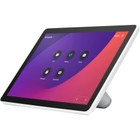
Webex CS-T10-TS-K9 Room Navigator Table-Stand Version - 1920 x 1200 Live Video - Fast Ethernet - USB - Tabletop

Business volume discounts
Technical guidance
Preparation & staging
QC · ON · AB · BC
Product Features
Technical Overview
This Room Navigator delivers 1920x1200 live video resolution for crisp visual feedback during conference calls. The display supports real-time video previews and system status updates, giving users immediate visual confirmation of meeting parameters and connectivity status.
Network connectivity is handled through a single Fast Ethernet port with 10/100Base-TX technology, providing up to 100Mbps data transfer rates for responsive control signaling and system communication. A USB 2.0 port offers additional peripheral connectivity options for system management and configuration tasks.
This section brings together practical product details such as Features, Maximum Video Resolution (Live), so buyers can judge configuration, deployment fit, and day-to-day suitability with less guesswork.
A strong technical summary explains how the product's interfaces, hardware profile, and operating characteristics work together in real deployment. Buyers often need this context to confirm compatibility with existing devices, expected performance in daily use, and whether installation will be straightforward for IT staff or end users.
Key Product Advantages
The Room Navigator table-stand version optimizes meeting room control with specialized features that enhance user experience and system reliability. Its compact design and focused functionality make it an efficient addition to professional collaboration environments.
Enhanced Visibility
Anti-glare and anti-fingerprint treatments maintain screen clarity in brightly lit conference rooms, reducing reflections and smudges that can obscure controls and status information.
- Reduces glare from overhead lighting
- Minimizes fingerprint marks during frequent use
- Maintains contrast for better readability
Reliable Connectivity
Fast Ethernet connectivity ensures responsive control signaling between the Navigator and Room Series systems, supporting smooth meeting transitions and real-time status updates.
- 100Mbps data transfer capability
- Standard RJ-45 network interface
- Compatible with existing network infrastructure
Deployment / Use Cases
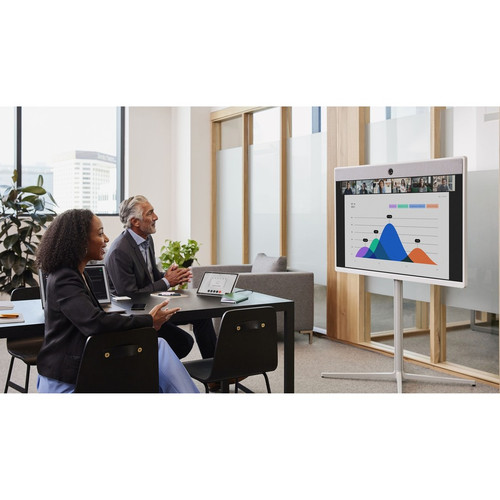
The table-stand version of the Room Navigator is specifically designed for placement on conference room tables, providing convenient access for meeting participants. This positioning allows users to control room systems without leaving their seats, maintaining meeting flow and reducing interruptions.
Ideal for medium to large conference rooms where centralized control is essential, this device supports various collaboration scenarios including video conferences, presentation sessions, and hybrid meetings. Its compact footprint makes it suitable for rooms with limited table space while still providing full control functionality.
Conference Room Control
Place the Navigator at the center of conference tables for equitable access among participants, enabling quick adjustments to volume, camera controls, and meeting settings during active sessions.
System Status Monitoring
Use the live video display to monitor room system status, including connectivity indicators, active microphone zones, and camera framing, helping meeting organizers maintain optimal audio-visual conditions.
Physical Profile
With dimensions of 2.80" in height and 6.42" in depth, the Room Navigator presents a low-profile presence on conference tables that doesn't obstruct sightlines between participants. The tabletop form factor requires no permanent mounting, allowing flexible placement and easy repositioning as room layouts change. Weighing just 1.39 pounds, the device can be moved between rooms or stored securely when not in use.
- Depth
- 6.42" (163.07 mm)
- Height
- 2.80" (71.12 mm)
- Weight
- 1.39 lb (630.49 g)
Highlights
- 1920x1200 live video resolution for clear visual feedback
- Fast Ethernet connectivity with 100Mbps transfer capability
- Anti-glare and anti-fingerprint screen treatments
- Tabletop form factor for convenient conference room placement
- Single RJ-45 network port for reliable wired connectivity
- USB 2.0 port for peripheral connectivity options
- Compact dimensions ideal for space-constrained conference tables
- Lightweight design at 1.39 pounds for easy repositioning
Specifications
| Specifications | |
|---|---|
| Manufacturer | Cisco Systems, Inc |
| Manufacturer Part Number | CS-T10-TS-K9= |
| Brand Name | Webex |
| Product Model | TTC5-15 |
| Product Name | Room Navigator (table-stand version) |
| Product Type | Video Conference Equipment |
| Technical Information | |
| Features | Anti-glare,Anti-fingerprint |
| Video | |
| Maximum Video Resolution (Live) | 1920 x 1200 |
| Network & Communication | |
| Network Technology | 10/100Base-TX |
| Ethernet Technology | Fast Ethernet |
| Interfaces/Ports | |
| Network (RJ-45) | Yes |
| USB | Yes |
| Number of Network (RJ-45) Ports | 1 |
| Number of USB 2.0 Ports | 1 |
| Physical Characteristics | |
| Form Factor | Tabletop |
| Height | 2.80" (71.12 mm) |
| Depth | 6.42" (163.07 mm) |
| Weight (Approximate) | 1.39 lb (630.49 g) |
FAQ
What is the maximum video resolution supported by this Room Navigator?
The Webex Room Navigator table-stand version supports live video resolution up to 1920 x 1200 pixels. This resolution provides clear visual feedback for system status displays and video previews during conference calls, ensuring users can easily read control interfaces and monitor room system conditions.
What type of network connectivity does this device offer?
This Room Navigator features Fast Ethernet connectivity through a single RJ-45 port with 10/100Base-TX technology. This provides data transfer rates up to 100Mbps, ensuring responsive communication between the Navigator and connected Webex Room Series systems for reliable control signaling during meetings.
How many USB ports are available on this Room Navigator?
The device includes one USB 2.0 port for peripheral connectivity. This port supports additional configuration options and management functions, though the primary control interface is handled through the touch display and network connection to the Room Series system.
What are the physical dimensions of this table-stand version?
The Room Navigator table-stand version measures 2.80 inches in height and 6.42 inches in depth, with a weight of approximately 1.39 pounds. These compact dimensions make it suitable for placement on conference room tables without occupying excessive space or obstructing participant sightlines.
What screen features help with visibility in conference rooms?
The display incorporates anti-glare and anti-fingerprint treatments to maintain clarity in various lighting conditions. These features reduce reflections from overhead lighting and minimize smudges from frequent touch interactions, ensuring the control interface remains readable throughout extended meeting sessions.
How does the tabletop form factor benefit conference room deployment?
The tabletop design allows flexible placement on conference room surfaces without requiring permanent mounting. This enables convenient access for meeting participants, easy repositioning as room layouts change, and simple relocation between different conference spaces when needed for temporary setups or room sharing arrangements.
What camera resolution or video format is listed?
It features a display specification of 1920 x 1200, giving you clear visuals for work and media use.
What field of view or room-coverage detail is listed?
Display-oriented products are best judged through screen, connectivity, and installation specifications. Those facts help buyers confirm visual fit, mounting flexibility, and deployment suitability more clearly than generic summary text.
| Qty | Price | Available |
|---|