








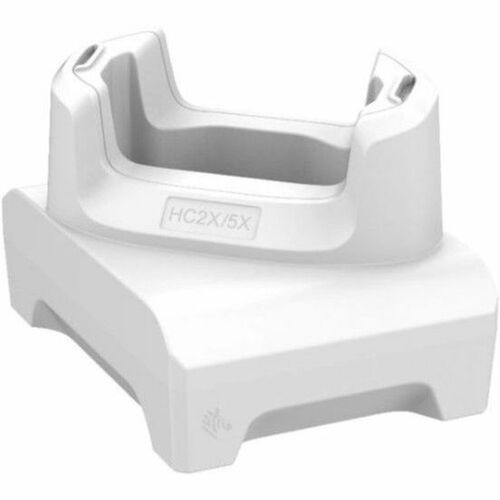

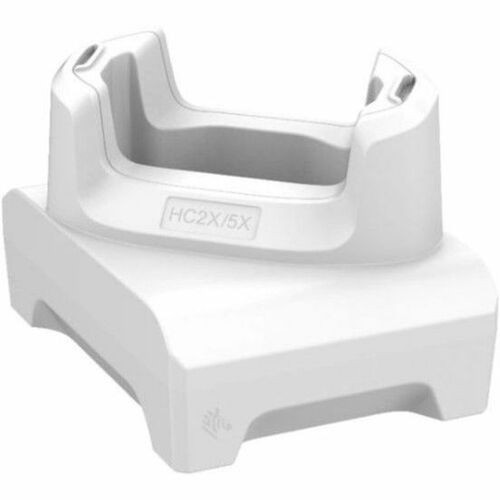
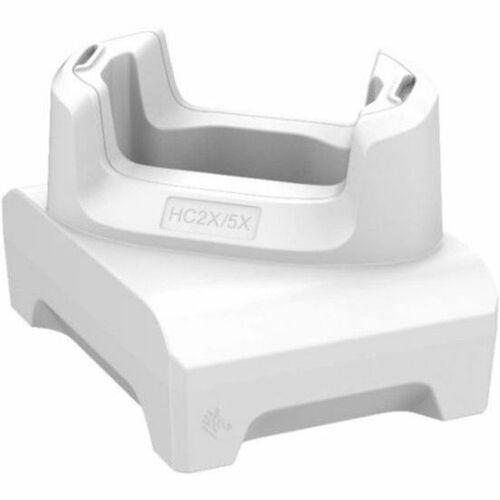
Zebra CRD-HC2L5L-BS1CO Single-Slot USB-C Docking Cradle for Mobile Computers - White

Business volume discounts
Technical guidance
Preparation & staging
QC · ON · AB · BC
Product Features
Technical Overview
This docking cradle employs docking connectivity technology to establish a stable connection between your mobile computer and peripheral devices or network resources. The USB Type C interface delivers both data transfer and power delivery through a single reversible connector, eliminating the frustration of incorrect plug orientation.
The cradle supports charging for one mobile computer at a time, providing dedicated power management for your device. This focused approach ensures consistent charging performance without the complexity of multi-device power sharing.
This section brings together practical product details such as Connectivity Technology, Charging Capability, Number Of Devices Charged Simultaneously, Host Interface, so buyers can judge configuration, deployment fit, and day-to-day suitability with less guesswork.
A strong technical summary explains how the product's interfaces, hardware profile, and operating characteristics work together in real deployment. Buyers often need this context to confirm compatibility with existing devices, expected performance in daily use, and whether installation will be straightforward for IT staff or end users.
Key Product Advantages
This Zebra docking cradle streamlines mobile computer management in enterprise environments by combining charging and connectivity in a single compact solution.
Simplified Docking Operation
The USB Type C interface provides a fast, reversible connection that makes docking intuitive and error-free, reducing training time and operational errors.
- No orientation frustration
- Quick connect/disconnect
- Single-cable solution
Reliable Charging Management
Integrated charging capability ensures your mobile computer maintains optimal battery levels while docked, ready for immediate deployment when needed.
- Consistent power delivery
- Battery maintenance
- Ready-state assurance
Enterprise-Grade Compatibility
Specifically designed for Zebra mobile computers including TC21, TC26, HC20, and HC50 models, ensuring perfect fit and function in your existing device ecosystem.
- Model-specific design
- Seamless integration
- Proven compatibility
Deployment / Use Cases
This docking cradle serves as an essential component in mobile computer deployment strategies across various enterprise environments. It provides the bridge between mobile computing flexibility and stationary workstation convenience.
In retail settings, the cradle transforms handheld scanners into fixed-point terminals during inventory counts or customer service stations. For warehouse operations, it creates charging stations at packing stations or management offices where devices need regular power replenishment. In healthcare environments, it enables mobile computers to serve as charting stations or medication administration points while maintaining charge.
Retail Point-of-Service Stations
Create fixed service points where mobile computers can process transactions, look up inventory, or manage customer interactions while charging securely.
Warehouse Management Hubs
Establish charging and synchronization points at packing stations, receiving areas, or supervisor stations where devices need regular power and data updates.
Highlights
- Single-slot docking cradle for Zebra mobile computers
- USB Type C host interface for fast, reversible connectivity
- Integrated charging capability maintains device battery levels
- Compatible with TC21, TC26, HC20, and HC50 mobile computer models
- White finish suits professional enterprise environments
- Docking technology provides stable connection to peripherals
- Charges one mobile computer simultaneously
- Transforms mobile devices into semi-stationary workstations
Specifications
| Specifications | |
|---|---|
| Manufacturer | Zebra Technologies Corporation |
| Manufacturer Part Number | CRD-HC2L5L-BS1CO |
| Brand Name | Zebra |
| Product Name | Cradle |
| Product Type | Cradle |
| Technical Information | |
| Connectivity Technology | Docking |
| Charging Capability | Yes |
| Number Of Devices Charged Simultaneously | 1 |
| Device Supported | Mobile Computer |
| Interfaces/Ports | |
| Host Interface | USB Type C |
| Physical Characteristics | |
| Color Family | White |
| Product Color | White |
| Miscellaneous | |
| Compatibility | Zebra Mobile Computers: TC21 TC26 TC21-HC TC26-HC HC20 HC50 |
User Manual
FAQ
What Zebra mobile computer models are compatible with this docking cradle?
This docking cradle is specifically compatible with Zebra TC21, TC26, TC21-HC, TC26-HC, HC20, and HC50 mobile computer models. The design ensures proper physical fit and electrical connection for these enterprise handheld devices.
Does this cradle provide charging capability for the docked mobile computer?
Yes, the cradle includes integrated charging capability. When you dock a compatible Zebra mobile computer, it will charge the device's battery while maintaining a stable data connection through the USB Type C interface.
How many mobile computers can charge simultaneously in this docking cradle?
This is a single-slot docking cradle designed to charge one mobile computer at a time. The focused design ensures optimal charging performance and secure device placement without the complexity of multi-device power management.
What type of host interface does this docking cradle use?
The cradle uses a USB Type C host interface. This modern connector provides fast data transfer capabilities and supports power delivery through a single reversible cable, eliminating orientation concerns during docking operations.
What is the primary color of this Zebra docking cradle?
The cradle features a white finish throughout, with both the color family and product color specified as white. This clean appearance maintains professional aesthetics in various enterprise environments including retail, warehouse, and office settings.
What connectivity technology does this cradle employ for device connection?
The cradle uses docking connectivity technology to establish a stable connection between your mobile computer and peripheral devices or network resources. This technology provides reliable data transfer while supporting the integrated charging function through the USB Type C interface.
What refresh rate or brightness details are available?
Display-oriented products are best judged through screen, connectivity, and installation specifications. Those facts help buyers confirm visual fit, mounting flexibility, and deployment suitability more clearly than generic summary text.
What input or connectivity options are listed?
Display-oriented products are best judged through screen, connectivity, and installation specifications. Those facts help buyers confirm visual fit, mounting flexibility, and deployment suitability more clearly than generic summary text.
| Qty | Price | Available |
|---|


