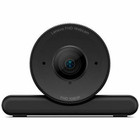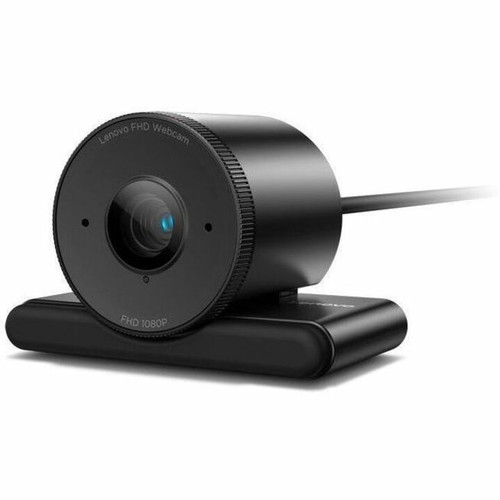
Lenovo 4XC1Q44952 Webcam - Full HD 1080p Video - 1-Pack

Business volume discounts
Technical guidance
Preparation & staging
QC · ON · AB · BC
Product Features
Technical Overview
This webcam captures video at Full HD 1080p resolution, providing a sharp image quality that reduces pixelation and maintains clarity even when viewed on larger displays. The 1920 x 1080 pixel count supports standard widescreen aspect ratios, aligning with common monitor and video conferencing platform requirements.
The device operates as a standalone USB peripheral, requiring no additional drivers for basic functionality on most operating systems. Its compact form factor and minimal weight contribute to a low-profile installation, avoiding desk clutter while ensuring stable positioning during extended use.
Relevant factors for this section include Maximum Video Resolution, Screen Mode, Weight (Approximate). When those points are considered together, they give buyers a clearer picture of how the product is equipped, how it fits into deployment, and what kind of day-to-day role it is meant to support.
Key Product Advantages
The Lenovo webcam focuses on delivering essential video conferencing performance with a straightforward design that prioritizes reliability and ease of use. Its high-resolution output ensures professional-grade video quality, while the lightweight construction supports versatile mounting options without adding bulk.
Crisp Full HD Video
Captures 1920 x 1080 resolution for detailed and clear video feeds, enhancing participant visibility and engagement during virtual meetings.
- Reduces blur and pixelation
- Supports widescreen displays
Compact and Portable
Weighs only 8.47 oz (240 g) for easy transport and flexible placement on various surfaces or monitor mounts.
- Minimal desk footprint
- Stable on slim bezels
Plug-and-Play Setup
USB connectivity enables quick installation without complex software, making it accessible for users of all technical levels.
- Compatible with standard USB ports
- No driver installation required for basic use
Deployment / Use Cases
This webcam is ideal for environments where reliable video communication is critical. Its Full HD resolution makes it suitable for business meetings, remote team collaborations, and client presentations, where clear visual representation supports professional interactions.
In educational settings, the camera facilitates virtual classrooms and online tutoring by providing sharp video for instructors and students. For home offices and freelance professionals, it offers an affordable upgrade to built-in laptop cameras, improving video quality for interviews, webinars, and content creation without requiring extensive setup.
Relevant factors for this section include Maximum Video Resolution, Screen Mode, Weight (Approximate). When those points are considered together, they give buyers a clearer picture of how the product is equipped, how it fits into deployment, and what kind of day-to-day role it is meant to support.
Corporate Conferencing
Enhances video quality in boardrooms and remote work setups, ensuring participants are clearly visible during multi-party calls.
Educational and Training
Supports virtual learning environments by delivering clear instructor video, aiding in demonstrations and interactive sessions.
Physical Profile
The webcam features a lightweight design at 8.47 oz (240 g), making it easy to attach to monitor bezels, laptop screens, or tripod mounts without causing strain or instability. Its compact size allows for discreet placement, maintaining a clean workspace while ensuring the lens remains properly aligned for optimal video capture.
The physical profile is practical for deployment planning because the dimensions and weight are clearly defined: 8.47 oz (240 g). This helps confirm rack, shelf, desk, or cabinet fit before installation.
- Weight
- 8.47 oz (240 g)
Highlights
- Full HD 1920 x 1080 video resolution for clear conferencing
- Compact and lightweight design at 8.47 oz (240 g)
- Plug-and-play USB connectivity for easy setup
- Single-unit packaging for individual deployment
- Ideal for business, education, and home office use
- Enhances video quality over built-in laptop cameras
- Supports widescreen aspect ratios
- Minimal footprint for flexible placement
Specifications
| Specifications | |
|---|---|
| Manufacturer | Lenovo Group Limited |
| Manufacturer Part Number | 4XC1Q44952 |
| Brand Name | Lenovo |
| Product Name | Webcam |
| Packaged Quantity | 1 |
| Product Type | Webcam |
| Display & Graphics | |
| Maximum Video Resolution | 1920 x 1080 |
| Screen Mode | Full HD |
| Physical Characteristics | |
| Weight (Approximate) | 8.47 oz (240 g) |
FAQ
What video resolution does this Lenovo webcam support?
The Lenovo 4XC1Q44952 webcam captures video at Full HD 1920 x 1080 resolution. This provides sharp, detailed imagery suitable for professional video conferencing, virtual meetings, and streaming, ensuring participants appear clear even on larger displays.
How is the webcam connected to a computer?
This webcam uses a USB connection for power and data transfer. It operates as a plug-and-play peripheral, typically requiring no additional driver installation for basic functionality on most operating systems, making setup straightforward and accessible.
What is the weight of the webcam?
The webcam weighs approximately 8.47 oz (240 g). This lightweight design allows for easy attachment to monitor bezels, laptop screens, or tripods without adding significant bulk or causing instability during use.
Is this webcam sold as a single unit or in multi-packs?
The Lenovo 4XC1Q44952 is packaged as a single unit (1-pack). This makes it suitable for individual deployments in home offices, corporate desks, or educational settings where one camera per user is required.
What are typical use cases for this Full HD webcam?
This webcam is ideal for business video conferencing, remote team collaborations, virtual classrooms, online tutoring, and home office setups. Its Full HD resolution enhances video quality for professional interactions, interviews, webinars, and content creation.
Does the webcam require special software for operation?
No special software is required for basic operation. The webcam functions as a standard USB video device, compatible with most video conferencing platforms and operating systems without additional drivers, though optional software may offer advanced settings.
| Qty | Price | Available |
|---|