











Shipping included*
Exclusions
Additional shipping fees may apply in rare circumstances for deliveries outside standard service areas. In most cases, this only potentially affects shipments to the Northwest Territories and Yukon, as well as certain heavy or oversized items.
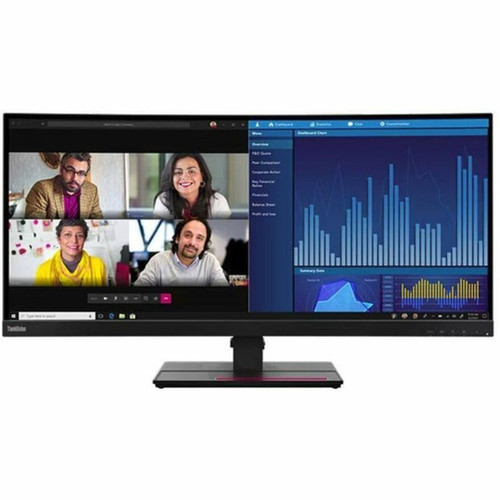
Lenovo 63F2RAR3U3 ThinkVision P34w-20 34" UWQHD Curved IPS Monitor - 3440 x 1440300 cd/m² - 60Hz - 21: 9 - Raven Black

Business volume discounts
Technical guidance
Preparation & staging
QC · ON · AB · BC
Product Features
Product Overview
The Lenovo ThinkVision P34w-20 is a 34-inch curved ultrawide monitor engineered for immersive visual experiences and multitasking efficiency. Its UWQHD resolution and 21:9 aspect ratio deliver expansive screen real estate, making it ideal for professionals who require side-by-side application views, content creators working with wide timelines, and users seeking cinematic media playback without letterboxing.
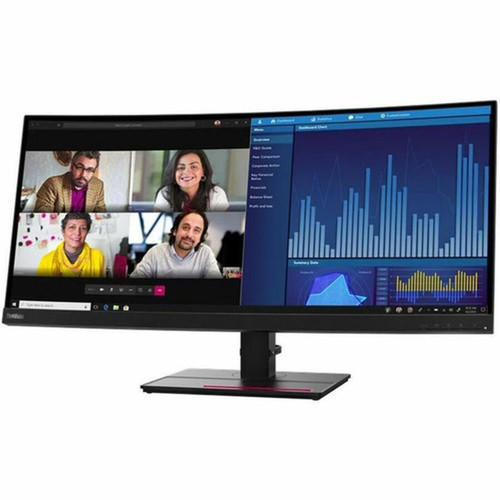
Built with an IPS panel, this monitor ensures consistent color accuracy and wide 178-degree viewing angles, maintaining image integrity from virtually any position. The curved design enhances depth perception and reduces eye strain during extended use, while the Raven Black finish provides a sleek, professional aesthetic suitable for modern office and home office environments.
Relevant factors for this section include Number of Screens, Screen Size Class, Viewable Screen Size, Maximum Resolution. When those points are considered together, they give buyers a clearer picture of how the product is equipped, how it fits into deployment, and what kind of day-to-day role it is meant to support.
Technical Overview
This monitor delivers precise visual performance with a 4 ms response time in Extreme Mode, minimizing motion blur for smooth transitions in fast-paced content. The 300 cd/m² brightness ensures clear visibility in various lighting conditions, supported by a 1,000:1 native contrast ratio and 3,000,000:1 dynamic contrast for deep blacks and vibrant highlights.
Color reproduction covers 99% of the sRGB spectrum, providing reliable accuracy for general productivity and content consumption. The WLED backlight technology offers uniform illumination with flicker-free operation, while features like ComfortView and Low Blue Light reduce eye fatigue during long sessions.
Relevant factors for this section include Number of Screens, Screen Size Class, Viewable Screen Size, Maximum Resolution. When those points are considered together, they give buyers a clearer picture of how the product is equipped, how it fits into deployment, and what kind of day-to-day role it is meant to support.
Key Product Advantages
Beyond core specs, this monitor integrates thoughtful features like Picture-by-Picture and Picture-in-Picture modes for simultaneous input display, anti-glare coating for reduced reflections, and cable management channels to keep workspaces tidy. The inclusion of integrated stereo speakers adds convenience for basic audio needs without external peripherals.
Immersive Ultrawide Format
The 21:9 aspect ratio and curved 34.1-inch screen create a panoramic view that enhances productivity and entertainment, eliminating the need for dual monitors in many scenarios.
Professional Connectivity Suite
With USB-C, dual HDMI 2.0, and DisplayPort inputs, plus a built-in KVM switch and USB hub, this monitor simplifies cable management and device switching for streamlined workflows.
Ergonomic Flexibility
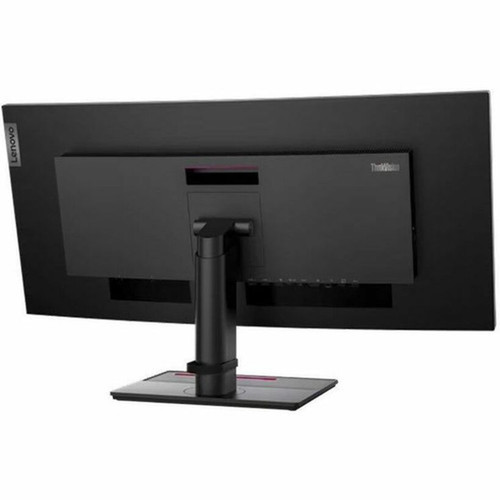
The fully adjustable stand supports height, swivel, and tilt adjustments, and VESA mount compatibility allows for custom mounting solutions to fit any desk or multi-monitor setup.
Deployment / Use Cases
The ThinkVision P34w-20 excels in environments where screen space and visual clarity are paramount. Financial analysts and data scientists can leverage the ultrawide canvas to view multiple spreadsheets or dashboards concurrently. Video editors and graphic designers benefit from the extended timeline view and accurate color representation across the wide IPS panel.
For corporate and home office setups, the KVM switch functionality allows users to control two computers with a single keyboard, mouse, and monitor, reducing clutter and streamlining multitasking between devices. The monitor's professional design and adjustable stand make it a versatile fit for open-plan offices, private workstations, and creative studios alike.
Multitasking & Productivity
Ideal for professionals who need to keep multiple applications, documents, or browser tabs visible simultaneously without switching windows.
Media & Entertainment
The curved UWQHD display and 21:9 ratio provide a cinematic experience for movies, gaming, and streaming content with minimal bezel distraction.
Physical Profile
Designed with a practical footprint, the monitor measures 32.18 inches wide, 24.46 inches high, and 9.65 inches deep with the stand installed. The Raven Black finish offers a neutral, professional look that complements most office decor. At 23.81 pounds with the stand, it remains stable on desktops while being manageable for installation. VESA 100x100 mm mounting support provides flexibility for arm or wall mounting, enabling optimized viewing angles and space-saving configurations.
- Width
- 32.18" (817.30 mm)
- Depth
- 9.65" (245 mm)
- Height
- 24.46" (621.40 mm)
- Weight
- 16.31 lb (7400 g)
Highlights
- 34.1-inch curved UWQHD display with 3440 x 1440 resolution for immersive visuals
- IPS panel technology ensures consistent colors and wide 178-degree viewing angles
- 21:9 ultrawide aspect ratio eliminates letterboxing and enhances multitasking
- 300 cd/m² brightness with 99% sRGB color gamut for accurate, vibrant images
- 4 ms response time (Extreme Mode) reduces motion blur in fast-paced content
- Includes USB-C, dual HDMI 2.0, and DisplayPort inputs for versatile connectivity
- Built-in KVM switch and USB hub streamline multi-device workflows
- Fully adjustable stand with height, swivel, and tilt, plus VESA mount compatibility
- Eye comfort features like flicker-free backlight, Low Blue Light, and ComfortView
- Raven Black finish with integrated cable management for a clean setup
Specifications
| Specifications | |
|---|---|
| Manufacturer | Lenovo Group Limited |
| Manufacturer Part Number | 63F2RAR3U3 |
| Brand Name | Lenovo |
| Product Line | ThinkVision |
| Product Model | P34w-20 |
| Product Name | ThinkVision P34w-20 34" Monitor |
| Product Type | LED Monitor |
| Technical Information | |
| Number of Screens | 1 |
| Screen Size Class | 34" |
| Viewable Screen Size | 34.1" |
| Screen Mode | UWQHD |
| Panel Technology | In-plane Switching (IPS) Technology |
| Response Time | 4 ms |
| Response Time Details | 4 ms Extreme Mode,6 ms Normal Mode |
| Aspect Ratio | 21:9 |
| Pixel Pitch | 0.23250 mm x 0.23250 mm |
| Horizontal Viewing Angle | 178° |
| Vertical Viewing Angle | 178° |
| Backlight Technology | WLED |
| Features | sRGB,Anti-glare,Picture by Picture,Picture in Picture,Cable Lock Slot,Cable Management,Eye Comfort Technology,Flicker-free,Low Blue Light,Wide Viewing Angle,Natural Low Blue Light,Eye Care Technology,ComfortView,High Dynamic Range (HDR) |
| Curved Screen | Yes |
| Adjustable Stand | Yes |
| Stand Adjustments | Swivel,Tilt,Height |
| Video | |
| Maximum Resolution | 3440 x 1440 |
| Standard Refresh Rate | 60 Hz |
| Native Contrast Ratio | 1,000:1 |
| Dynamic Contrast Ratio | 3,000,000:1 |
| Brightness | 300 cd/m² |
| Color Gamut | 99% sRGB |
| Pixel Per Inch (PPI) | 109 |
| Audio | |
| Number of Speakers | 2 |
| Speakers | Yes |
| Interfaces/Ports | |
| HDMI | Yes |
| USB | Yes |
| DisplayPort | Yes |
| USB Type-C | Yes |
| Total Number of HDMI Ports | 2 |
| Number of DisplayPorts | 1 |
| Number of USB Ports | 1 |
| Number of USB Type-C 3.2 Gen 1 Ports | 1 |
| Total Number of USB Type-C Ports | 1 |
| Number of HDMI 2.0 Ports | 2 |
| Built-in Devices | |
| Built-in Devices | USB Hub,KVM Switch |
| Power Description | |
| Operating Power Consumption | 200 W |
| Maximum Power Consumption | 250 W |
| Physical Characteristics | |
| VESA Mount Compatible | Yes |
| Color Family | Black |
| Product Color | Raven Black |
| Height with Stand | 24.46" (621.40 mm) |
| Width with Stand | 32.18" (817.30 mm) |
| Depth with Stand | 9.65" (245 mm) |
| Weight (Approximate) | 16.31 lb (7400 g) |
| Weight with Stand (Approximate) | 23.81 lb (10800 g) |
User Manual
FAQ
What is the screen size and resolution of this monitor?
The Lenovo ThinkVision P34w-20 features a 34.1-inch viewable curved screen with an ultrawide UWQHD resolution of 3440 x 1440 pixels. This 21:9 aspect ratio provides ample horizontal space for multitasking and delivers sharp, detailed imagery suitable for professional and entertainment use.
Does this monitor support USB-C connectivity?
Yes, this monitor includes one USB Type-C 3.2 Gen 1 port. This allows for video input, data transfer, and power delivery through a single cable, simplifying connections with compatible laptops and devices while reducing desk clutter.
What panel technology is used, and how does it benefit viewing?
It uses an In-plane Switching (IPS) panel, which offers consistent color accuracy and wide 178-degree horizontal and vertical viewing angles. This means colors remain true and images stay clear even when viewed from off-center positions, making it ideal for collaborative settings or multi-monitor setups.
Is the stand adjustable, and can the monitor be wall-mounted?
The stand provides height, swivel, and tilt adjustments for ergonomic positioning. Additionally, the monitor is VESA mount compatible with a 100x100 mm pattern, allowing for installation on monitor arms or wall mounts to save desk space or achieve custom viewing angles.
What is the refresh rate and response time for gaming or video?
This monitor has a standard 60 Hz refresh rate and a 4 ms response time in Extreme Mode (6 ms in Normal Mode). These specs help reduce motion blur and ghosting, delivering smooth visuals for general gaming, video playback, and fast-moving content, though it is not designed for competitive high-refresh-rate gaming.
What built-in features enhance productivity and connectivity?
It includes a built-in KVM switch, allowing you to control two computers with one keyboard, mouse, and monitor. There's also a USB hub for peripheral connections, Picture-by-Picture/Picture-in-Picture modes for multi-input display, and cable management channels to keep your workspace organized and professional.
| Qty | Price | Available |
|---|


