Lenovo 4X90U90618 Hybrid USB-C to USB-A Data Transfer Cable - 3. 3 ft (1 m) - 10 Gbit/s - Black

Business volume discounts
Technical guidance
Preparation & staging
QC · ON · AB · BC
Product Features
Technical Overview
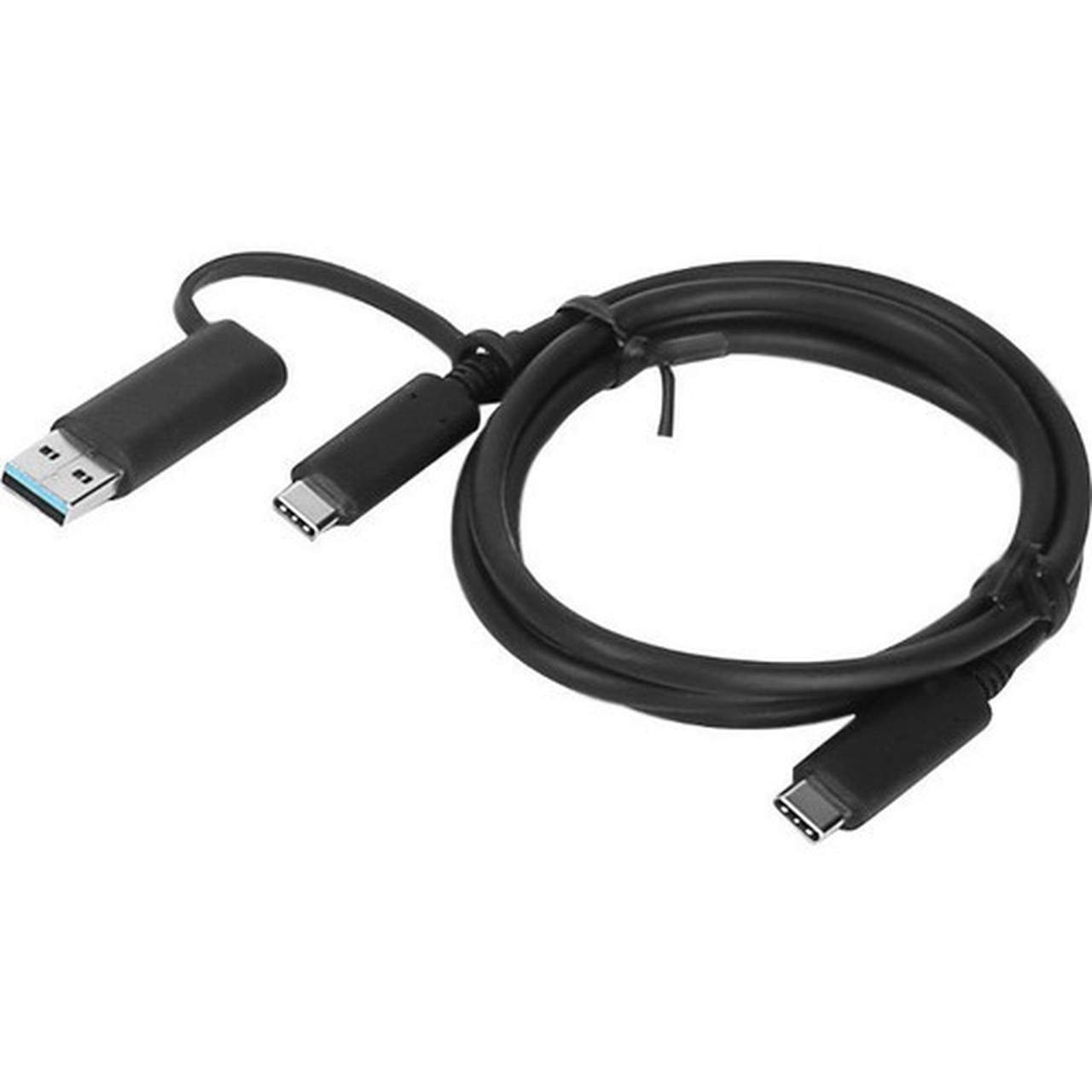
This USB data transfer cable implements a hybrid connector architecture with USB Type-C male connectors on both ends, plus an additional USB 3.0 Type-A male connector on the second end. The 3.3-foot (1-meter) length provides sufficient reach for typical workspace configurations while maintaining signal integrity for 10 Gbit/s data transfer rates.
The cable supports notebook connectivity through its USB-C interfaces, which deliver both data transfer and power delivery capabilities when connected to compatible devices. The USB 3.0 Type-A connector extends compatibility to legacy systems and peripherals that still utilize traditional USB-A ports.
This section brings together practical product details such as Cable Type, Cable Length, Connector Type on First End, Color Family, so buyers can judge configuration, deployment fit, and day-to-day suitability with less guesswork.
Key Product Advantages
The hybrid design of this Lenovo cable addresses the transitional period between USB-C and USB-A device ecosystems. By incorporating both connector types in a single cable solution, users can maintain connectivity across mixed-device environments without carrying multiple cables or adapters.
Dual Connectivity
Features both USB Type-C and USB 3.0 Type-A connectors for maximum compatibility with modern and legacy notebook systems.
- USB Type-C to USB Type-C connections
- USB Type-C to USB 3.0 Type-A connections
- No adapter required for mixed interfaces
High-Speed Data Transfer
Supports 10 Gbit/s data transfer rates for efficient file transfers and data synchronization between connected devices.
- USB 3.2 Gen 2 compatible speeds
- Maintains signal integrity over 3.3-foot length
- Suitable for large file transfers
Deployment / Use Cases
This hybrid USB cable serves as an essential connectivity tool for notebook users working in environments with mixed device interfaces. The 3.3-foot length makes it ideal for desk setups where devices are within arm's reach, providing sufficient slack for comfortable positioning without cable strain.
Common deployment scenarios include connecting USB-C equipped notebooks to USB-A peripherals such as external hard drives, docking stations, or legacy accessories. The cable also supports direct notebook-to-notebook connections for data transfer between USB-C devices, making it useful for collaborative work environments and IT support situations.
Mixed-Environment Connectivity
Bridge the gap between modern USB-C notebooks and existing USB-A peripherals, eliminating the need for separate adapters in transitional IT environments.
Notebook Data Management
Transfer files between notebooks, connect to external storage, or link to docking stations with a single cable that handles multiple connection types.
Highlights
- Hybrid USB-C to USB-A cable with dual connector options
- 3.3-foot (1-meter) length for flexible workspace positioning
- 10 Gbit/s data transfer speed for efficient file transfers
- USB Type-C male connectors on both ends
- Additional USB 3.0 Type-A male connector on second end
- Designed specifically for notebook connectivity
- Black color matches standard workspace aesthetics
- Plug-and-play operation with no drivers required
Specifications
| Specifications | |
|---|---|
| Manufacturer | Lenovo Group Limited |
| Manufacturer Part Number | 4X90U90618 |
| Brand Name | Lenovo |
| Product Name | Hybrid USB-C With USB-A Cable |
| Product Type | Data Transfer Cable |
| Technical Information | |
| Cable Type | USB |
| Cable Length | 3.3 ft (1 m) |
| Connector Type on First End | USB Type C - Male |
| Connector on First End Details | 1 x USB Type C - Male |
| Connector Type on Second End | USB Type C - Male,USB 3.0 Type A - Male |
| Connector on Second End Details | 1 x USB Type C - Male,1 x USB 3.0 Type A - Male |
| Device Supported | Notebook |
| Data Transfer Rate | 10 Gbit/s |
| Physical Characteristics | |
| Color Family | Black |
| Product Color | Black |
| Miscellaneous | |
| Country of Origin | China |
FAQ
What types of connectors does this Lenovo cable have?
This hybrid cable features USB Type-C male connectors on both ends, plus an additional USB 3.0 Type-A male connector on the second end. This configuration allows for USB-C to USB-C connections, USB-C to USB-A connections, and provides flexibility when connecting between devices with different interface types.
What is the maximum data transfer speed supported?
The Lenovo 4X90U90618 cable supports data transfer rates up to 10 Gbit/s. This speed is compatible with USB 3.2 Gen 2 specifications and enables efficient transfer of large files between connected devices, making it suitable for data backup, file synchronization, and peripheral connectivity tasks.
How long is the cable and is this sufficient for typical use?
The cable measures 3.3 feet (1 meter) in length, which provides adequate reach for most desk setups where devices are within arm's length. This length allows for comfortable positioning of notebooks and peripherals without excessive cable slack while maintaining signal integrity for the supported 10 Gbit/s transfer speeds.
Is this cable specifically designed for notebook computers?
Yes, this cable is designed with notebook connectivity in mind. The hybrid connector configuration addresses the common scenario where notebook users need to connect to both modern USB-C devices and legacy USB-A peripherals. The 3.3-foot length is optimized for typical notebook workspace configurations.
What color is the cable and does it come in other options?
This Lenovo cable features a standard black finish that complements most workspace environments. black is the only color option listed for this particular model (4X90U90618), providing a professional appearance that blends with typical office and home office setups.
Can this cable be used for charging devices in addition to data transfer?
While primarily designed for data transfer at 10 Gbit/s speeds, the USB Type-C connectors on this cable can support power delivery when connected to compatible devices. However, for optimal charging performance, it's recommended to verify compatibility with specific notebook models and use dedicated charging cables when maximum power delivery is required.
What refresh rate or brightness details are available?
Display-oriented products are best judged through screen, connectivity, and installation specifications. Those facts help buyers confirm visual fit, mounting flexibility, and deployment suitability more clearly than generic summary text.
What input or connectivity options are listed?
Connectivity options include USB Type C - Male, helping the product integrate into common office or home setups.
| Qty | Price | Available |
|---|