
Lenovo 4XF1A14358 Mounting Bracket for Docking Station and Monitor - Supports Up to 24" Screens

Business volume discounts
Technical guidance
Preparation & staging
QC · ON · AB · BC
Product Features
Technical Overview
This mounting bracket is engineered to support Lenovo's current docking station portfolio, including USB-C, Thunderbolt 3, and hybrid USB-C/USB-A models. The 24-inch maximum screen size specification ensures compatibility with common business monitor sizes while maintaining structural integrity.
The lightweight aluminum construction at 10.72 ounces (304 grams) provides durability without adding excessive weight to your desk setup. All necessary mounting hardware is included, with the quick setup guide ensuring straightforward installation for IT administrators or end users.
Key Product Advantages
This mounting bracket transforms how docking stations integrate with monitor setups, offering several practical benefits for business environments.
Space Optimization
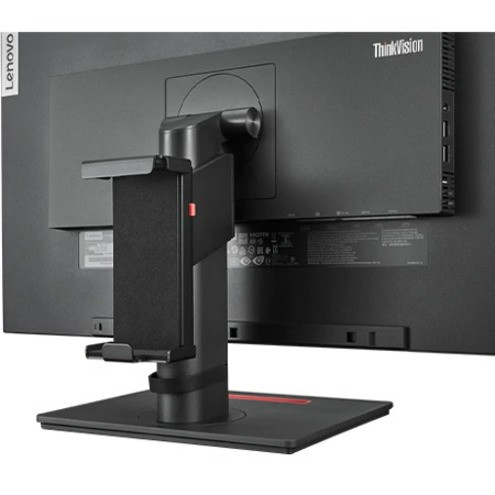
Combines docking station and monitor into a single footprint, freeing up valuable desk space for other work essentials.
- Reduces desk clutter
- Creates cleaner workspace
- Improves ergonomic positioning
Comprehensive Compatibility
Supports multiple generations of Lenovo docking technology, ensuring investment protection as you upgrade workstations.
- ThinkPad USB3.0 Ultra Dock
- ThinkPad USB-C Dock Gen 2
- ThinkPad Thunderbolt 3 Dock
- ThinkPad Hybrid USB-C and USB-A Dock
Professional Installation
Includes all necessary components for a complete installation with integrated cable management.
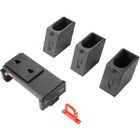
- Docking bracket included
- Monitor-stand bracket included
- Cable clip for organization
- Quick setup guide
Deployment / Use Cases
The Lenovo 4XF1A14358 Mounting Bracket serves multiple practical applications in modern business environments where desk space optimization and professional presentation matter.
In hot-desking or shared workspace scenarios, this bracket ensures docking stations remain securely mounted alongside monitors, preventing accidental disconnection or damage during transitions between users. For permanent workstation setups, it creates a consistently organized appearance that maintains professional standards while simplifying cable management behind monitors.
Corporate Workstation Standardization
IT departments can deploy this bracket across multiple workstations to maintain consistent desk layouts, simplify support, and reduce cable-related issues.
Conference Room Integration
In meeting spaces with shared docking stations, this bracket keeps equipment securely mounted and ready for use while maintaining a clean, professional appearance.
Physical Profile
Constructed from lightweight yet durable materials, this mounting bracket weighs just 10.72 ounces (304 grams) to minimize added load on desk surfaces while providing sufficient structural support. The design accommodates standard monitor stands and docking station form factors without requiring additional adapters or modifications.
- Weight
- 10.72 oz (304 g)
What's in the Box
This mounting bracket ships complete with all components needed for installation.
Highlights
- Securely mounts compatible Lenovo docking stations alongside monitors
- Supports monitors up to 24 inches in screen size
- Lightweight construction at 10.72 ounces (304 grams)
- Includes docking bracket, monitor-stand bracket, and cable clip
- Compatible with multiple Lenovo docking station models
- Reduces desk clutter by combining two components
- Improves cable management with included cable clip
- Quick setup guide simplifies installation
Specifications
| Specifications | |
|---|---|
| Manufacturer | Lenovo Group Limited |
| Manufacturer Part Number | 4XF1A14358 |
| Brand Name | Lenovo |
| Product Name | Docking Station Mounting Bracket G2-24" |
| Product Type | Mounting Bracket |
| Product Information | |
| Device Supported | Docking Station,Monitor |
| Maximum Screen Size Supported | 24" |
| Physical Characteristics | |
| Weight (Approximate) | 10.72 oz (304 g) |
| Miscellaneous | |
| Package Contents | 1 x Docking Bracket 1 x Monitor-Stand Bracket 1 x Cable Clip 1 x Quick Setup Guide |
| Compatibility | Lenovo Docks: ThinkPad USB3.0 Ultra Dock ThinkPad USB 3.0 Pro Dock ThinkPad USB-C Dock ThinkPad USB-C Dock Gen 2 ThinkPad Thunderbolt 3 Dock ThinkPad Thunderbolt 3 Dock Gen 2 ThinkPad Hybrid USB-C and USB-A Dock |
FAQ
What Lenovo docking stations are compatible with this mounting bracket?
This bracket supports multiple Lenovo docking station models including the ThinkPad USB3.0 Ultra Dock, ThinkPad USB 3.0 Pro Dock, ThinkPad USB-C Dock, ThinkPad USB-C Dock Gen 2, ThinkPad Thunderbolt 3 Dock, ThinkPad Thunderbolt 3 Dock Gen 2, and ThinkPad Hybrid USB-C and USB-A Dock. It's designed specifically for Lenovo's business docking ecosystem.
What is the maximum monitor size this bracket supports?
The Lenovo 4XF1A14358 Mounting Bracket supports monitors up to 24 inches in screen size. This specification ensures compatibility with common business monitor sizes while maintaining the structural integrity needed for secure mounting of both the monitor and docking station.
What components are included in the package?
The package includes all necessary hardware for installation: one docking bracket for mounting the docking station, one monitor-stand bracket for attaching to the monitor, one cable clip for managing excess cabling, and a quick setup guide with installation instructions. No additional components are required for basic installation.
How does this mounting bracket improve workspace organization?
This bracket consolidates your docking station and monitor into a single footprint, significantly reducing desk clutter. The included cable clip manages excess cabling, creating a cleaner workspace appearance while freeing up valuable desk real estate for other work essentials. This organization improves both aesthetics and ergonomics.
| Qty | Price | Available |
|---|