










Shipping included*
Exclusions
Additional shipping fees may apply in rare circumstances for deliveries outside standard service areas. In most cases, this only potentially affects shipments to the Northwest Territories and Yukon, as well as certain heavy or oversized items.
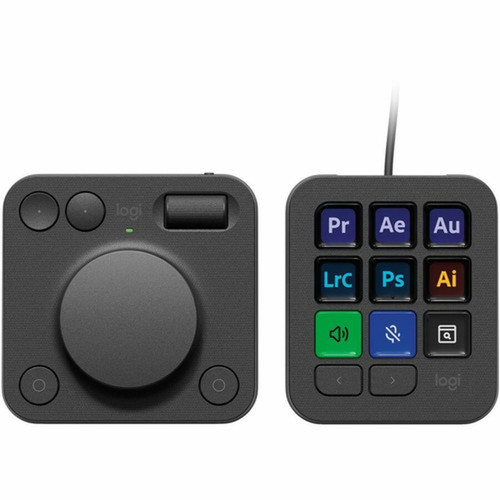
Logitech 920-012660 MX Creative Console Keypad & Dial - Graphite - USB-C Cable Keypad with Wireless Bluetooth Dialpad - Programmable Keys

Business volume discounts
Technical guidance
Preparation & staging
QC · ON · AB · BC
Product Features
Technical Overview
The keypad features a USB Type C host interface, ensuring fast and stable connectivity with modern computers. It includes programmable keys that can be mapped to specific functions or macros, and a backlight for visibility in low-light environments. The dialpad operates wirelessly via Bluetooth, providing smooth scrolling and navigation without cables.
Both components are powered by included AAA batteries, with the dialpad supporting wireless use for extended periods. The console is compatible with Windows 10 and macOS Ventura 13.0, making it versatile for cross-platform setups.
Relevant factors for this section include Keyboard/Keypad Type, Keyboard/Keypad Connectivity Technology, Backlight, Pointing Device Type. When those points are considered together, they give buyers a clearer picture of how the product is equipped, how it fits into deployment, and what kind of day-to-day role it is meant to support.
Key Product Advantages
The MX Creative Console streamlines complex tasks by offering direct access to frequently used commands and parameters. The dialpad provides intuitive control over sliders, brushes, and timelines, while the keypad handles shortcut execution with minimal effort.
These strengths make the product easier to deploy and manage in real environments, especially where reliability, usability, and day-to-day operational continuity matter. Notable benefits include Enhanced Precision, Customizable Workflow.
Enhanced Precision
The dialpad allows for fine-grained adjustments in creative software, improving accuracy in editing and design work.
- Smooth scrolling for timelines
- Precise parameter control
- Tactile feedback
Customizable Workflow
Programmable keys enable users to tailor the console to their specific applications and workflows, boosting productivity.
- Macro support
- Application-specific profiles
- Quick-access shortcuts
Deployment / Use Cases
This console is ideal for creative professionals working in graphic design, video production, audio editing, and 3D animation. It integrates seamlessly into studio setups, home offices, and on-the-go workstations where space is limited but functionality is critical.
Use cases include adjusting brush sizes in Photoshop, scrubbing through video timelines in Premiere Pro, mixing audio levels in DAWs, and navigating complex UI elements in CAD software. The compact design makes it suitable for desks with multiple monitors or portable setups.
Graphic Design
Map keys to layer operations and use the dial for brush opacity or zoom controls in applications like Illustrator or Affinity Designer.
Video Editing
Assign shortcuts to cut, trim, or add effects, while the dialpad handles timeline navigation and clip adjustments in editors like Final Cut Pro or DaVinci Resolve.
What's in the Box
The package includes all necessary components for immediate setup and use.
Highlights
- Programmable keypad with backlight for customizable shortcuts
- Wireless Bluetooth dialpad for precise scrolling and navigation
- USB Type C connectivity for reliable wired keypad operation
- Compact Graphite design with lightweight construction
- Compatible with Windows 10 and macOS Ventura 13.0
- Includes 2 x AAA batteries and USB C to C cable
- Ideal for creative software like Adobe Suite and video editors
- Plug-and-play setup with minimal configuration required
Specifications
| Specifications | |
|---|---|
| Manufacturer | Logitech |
| Manufacturer Part Number | 920-012660 |
| Brand Name | Logitech |
| Product Line | MX Creative Console |
| Product Name | MX Creative Console Keypad & Dial |
| Product Type | Keypad & Dial |
| Keyboard/Keypad | |
| Keyboard/Keypad Type | Keypad |
| Keyboard/Keypad Connectivity Technology | Cable |
| Backlight | Yes |
| Keyboard/Keypad Features | Programmable Keys |
| Pointing Device | |
| Pointing Device Type | Dialpad |
| Pointing Device Connectivity Technology | Wireless |
| Pointing Device Wireless Technology | Bluetooth |
| Scroller Type | Dialpad |
| Interfaces/Ports | |
| Keyboard/Keypad Host Interface | USB Type C |
| Battery Information | |
| Battery Included | Yes |
| Battery Size Supported | AAA |
| Physical Characteristics | |
| Keyboard/Keypad Color | Graphite |
| Pointing Device Color | Graphite |
| Keyboard/Keypad Height | 3.61" (91.70 mm) |
| Keyboard/Keypad Width | 3.07" (77.90 mm) |
| Keyboard/Keypad Depth | 1" (25.50 mm) |
| Pointing Device Height | 3.63" (92.10 mm) |
| Pointing Device Width | 3.69" (93.70 mm) |
| Pointing Device Depth | 1.33" (33.80 mm) |
| Keyboard/Keypad Weight (Approximate) | 3.39 oz (96 g) |
| Pointing Device Weight (Approximate) | 4.52 oz (128 g) |
| Miscellaneous | |
| Package Contents | MX Creative Console Keypad & Dial 2 x AAA Batteries USB C to C High-speed 2.0 Cable Stand User Documentation |
| Operating System Compatibility | Windows 10,Mac OS X 13.0 Ventura |
| Platform Supported | PC,Mac |
FAQ
What is the connectivity method for the keypad and dialpad?
The keypad connects via a wired USB Type C cable for stable, low-latency input. The dialpad uses wireless Bluetooth technology, allowing flexible placement without cables. This dual-connectivity setup reduces desk clutter while ensuring reliable performance for both components.
Is the Logitech MX Creative Console compatible with Mac computers?
Yes, the console is fully compatible with macOS Ventura 13.0 and later versions, as well as Windows 10. It supports both PC and Mac platforms, making it versatile for cross-platform creative workflows. The included software allows for customization on supported operating systems.
Does the keypad have backlighting, and is it programmable?
The keypad features a backlight for visibility in low-light conditions, enhancing usability during extended work sessions. It also includes programmable keys that can be customized with macros or application-specific shortcuts using Logitech's software, optimizing it for tasks like graphic design or video editing.
What type of batteries does the dialpad use, and are they included?
The dialpad operates on 2 x AAA batteries, which are included in the package. These batteries power the wireless Bluetooth functionality, providing extended use without frequent replacements. The keypad is wired and does not require batteries for operation.
What are the dimensions and weight of the keypad and dialpad?
The keypad measures 3.61" x 3.07" x 1" (91.70 mm x 77.90 mm x 25.50 mm) and weighs 3.39 oz (96 g). The dialpad is 3.63" x 3.69" x 1.33" (92.10 mm x 93.70 mm x 33.80 mm) and weighs 4.52 oz (128 g). Both are compact and lightweight, designed to fit comfortably on desks without occupying excessive space.
Can I use the MX Creative Console with video editing software?
Yes, the console is ideal for video editing applications like Adobe Premiere Pro, Final Cut Pro, and DaVinci Resolve. The dialpad provides smooth timeline navigation and parameter adjustments, while the programmable keypad can be set for shortcuts like cutting, trimming, or adding effects, streamlining the editing process.
| Qty | Price | Available |
|---|


