

TP-LINK EAP610GP-DESKTOP Omada EAP610GP Wi-Fi 6 Dual-Band Wireless Access Point - 1. 73 Gbps - 4x Gigabit PoE Ports - Desktop/Wall Mount

Business volume discounts
Technical guidance
Preparation & staging
QC · ON · AB · BC
Product Features
Technical Overview
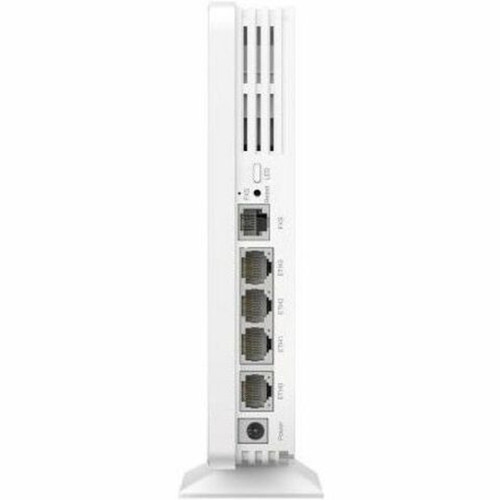
This access point operates on the IEEE 802.11 a/b/g/n/ac/ax standard, providing backward compatibility with older Wi-Fi devices while maximizing performance for modern Wi-Fi 6 clients. It features four Gigabit Ethernet ports, with one supporting Power over Ethernet (PoE) for simplified installation where power outlets are limited.
Advanced wireless technologies include Multi-User MIMO (MU-MIMO) for simultaneous data transmission to multiple devices and beamforming to focus signal strength toward connected clients, improving range and reliability. Network security is robust, supporting WPA3-ENT, WPA3-Personal, WPA2, and WPA encryption standards to protect business data.
Relevant factors for this section include Wireless LAN Standard, Network Band, Frequency Band, Ethernet Technology. When those points are considered together, they give buyers a clearer picture of how the product is equipped, how it fits into deployment, and what kind of day-to-day role it is meant to support.
Key Product Advantages
The EAP610GP is designed for operational efficiency, featuring low 17.30 W power consumption and compliance with RoHS environmental standards. Its compact, internal antenna design maintains a clean aesthetic while providing consistent coverage.
High-Speed Wi-Fi 6 Connectivity
Delivers up to 1.73 Gbps total wireless throughput, with optimized performance for high-density environments and bandwidth-intensive applications like video conferencing and file transfers.
Flexible Deployment Options
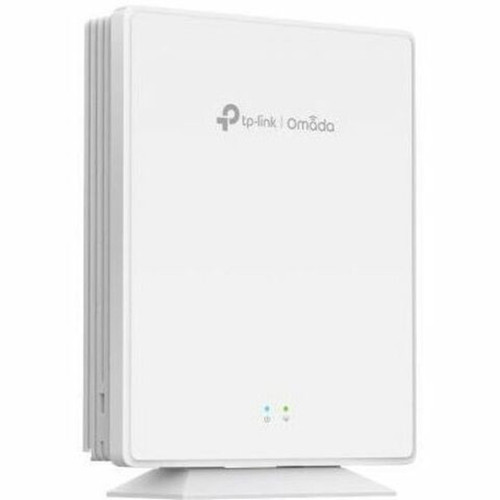
Supports both desktop placement and wall mounting, allowing installation in various locations without dedicated rack space. The included mounting kit simplifies setup.
Centralized Omada Management
Integrates seamlessly with the Omada SDN platform for unified control of networks, enabling features like seamless roaming, automatic adoption, and granular access policies across multiple access points.
Deployment / Use Cases
Ideal for small to medium-sized businesses, branch offices, schools, and retail stores needing to expand or upgrade wireless infrastructure. The dual-band design efficiently separates traffic, with the 5 GHz band handling high-speed applications and the 2.4 GHz band supporting legacy devices and broader coverage.
The PoE capability allows installation in ceilings or walls using a single Ethernet cable for both data and power, reducing cabling complexity. This makes it suitable for locations where electrical outlets are inaccessible or where a clean, professional installation is required.
Office Network Expansion
Deploy in open-plan offices or meeting rooms to provide reliable Wi-Fi for employees and guests, supporting seamless roaming as users move throughout the building.
Retail and Hospitality
Install in stores, hotels, or restaurants to offer secure guest Wi-Fi, point-of-sale connectivity, and support for IoT devices, all managed centrally through the Omada controller.
Physical Profile
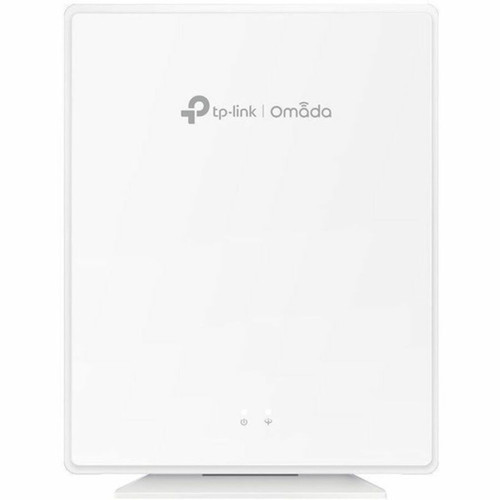
The access point features a compact, low-profile design measuring 5.51 inches wide, 6.89 inches deep, and 1.30 inches high, with a weight of approximately 1.08 pounds. Its desktop and wall-mountable form factor provides installation flexibility, and the internal antennas eliminate external protrusions for a discreet appearance.
The physical profile is practical for deployment planning because the dimensions and weight are clearly defined: 1.30" (33 mm), 5.51" (140 mm), 6.89" (175 mm), 1.08 lb (492 g). This helps confirm rack, shelf, desk, or cabinet fit before installation.
- Width
- 5.51" (140 mm)
- Depth
- 6.89" (175 mm)
- Height
- 1.30" (33 mm)
- Weight
- 1.08 lb (492 g)
What's in the Box
The package includes the Omada EAP610GP wireless access point, a desktop/wall mounting kit, and an installation guide to assist with setup and configuration.
Package contents include Omada EAP610GP Wireless Access Point Desktop/Wall Mounting Kit Installation Guide. These included items support setup, installation, and immediate deployment without needing to source the core bundled accessories separately.
Highlights
- Wi-Fi 6 dual-band access point with 1.73 Gbps aggregate speed
- Four Gigabit Ethernet ports with PoE support for simplified installation
- MU-MIMO and beamforming technologies for efficient multi-client performance
- Supports WPA3 encryption for enhanced network security
- Desktop or wall-mountable form factor with internal antennas
- Centralized management via TP-Link Omada SDN platform
- Low power consumption at 17.30 W
- RoHS compliant for environmental safety
Specifications
| Specifications | |
|---|---|
| Manufacturer | TP-LINK Technologies Co., Ltd |
| Manufacturer Part Number | EAP610GP-DESKTOP |
| Brand Name | TP-Link |
| Product Line | Omada |
| Product Model | EAP610GP |
| Product Name | Omada EAP610GP Wireless Access Point |
| Product Type | Wireless Access Point |
| Technical Information | |
| Wireless LAN Standard | IEEE 802.11 a/b/g/n/ac/ax |
| Network Band | Dual Band |
| Frequency Band | 2.40 GHz,5 GHz |
| Wireless Transmission Speed | 1.73 Gbit/s |
| MIMO Technology | Yes |
| MIMO Type | Multi User MIMO |
| Beamforming Technology | Yes |
| Data Encryption | Yes |
| Encryption Standard | WPA-PSK,WPA-ENT,WPA2-ENT,WPA2-PSK,WPA3-ENT,WPA3-Personal |
| Interfaces/Ports | |
| Ethernet Technology | Gigabit Ethernet |
| Number of Network (RJ-45) Ports | 4 |
| PoE (RJ-45) Port | Yes |
| Network & Communication | |
| Wi-Fi Generation | Wi-Fi 6 |
| Communication Protocols | SSH,SNMPv1/v2c/v3,RADIUS |
| Power Description | |
| Power Consumption | 17.30 W |
| Physical Characteristics | |
| Form Factor | Desktop,Wall Mountable |
| Antenna Form Factor | Internal |
| Height | 1.30" (33 mm) |
| Width | 5.51" (140 mm) |
| Depth | 6.89" (175 mm) |
| Weight (Approximate) | 1.08 lb (492 g) |
| Miscellaneous | |
| Package Contents | Omada EAP610GP Wireless Access Point Desktop/Wall Mounting Kit Installation Guide |
| Environmental Compliance | Restriction of Hazardous Substances (RoHS) |
User Manual
FAQ
What is the maximum wireless speed of the EAP610GP?
The TP-Link Omada EAP610GP delivers a maximum aggregate wireless speed of 1.73 Gbit/s across its dual bands. This includes up to 1201 Mbps on the 5 GHz band and 574 Mbps on the 2.4 GHz band, providing high throughput for business applications like video streaming and large file transfers.
Does this access point support Power over Ethernet (PoE)?
Yes, the EAP610GP includes a PoE-capable RJ-45 port. This allows the access point to receive both data and power over a single Ethernet cable, simplifying installation in locations without nearby electrical outlets and enabling cleaner deployments in ceilings or on walls.
How many Ethernet ports does the EAP610GP have?
This access point features four Gigabit Ethernet ports. These ports provide wired connectivity for devices like computers, printers, or IP cameras, and one of the ports supports PoE for flexible power options in network setups.
Can the EAP610GP be mounted on a wall?
Yes, the EAP610GP supports both desktop placement and wall mounting. The included mounting kit facilitates secure installation on walls, making it suitable for offices, retail spaces, or other environments where saving desk space or achieving optimal coverage is important.
What management options are available for this access point?
The EAP610GP integrates with TP-Link's Omada Software Defined Networking platform for centralized management. This allows network administrators to control multiple access points from a single interface, enabling features like automatic adoption, seamless roaming, and unified security policies across the network.
What security encryption standards does the EAP610GP support?
This access point supports a range of encryption standards including WPA3-ENT, WPA3-Personal, WPA2-ENT, WPA2-PSK, WPA-ENT, and WPA-PSK. These protocols provide robust security for business networks, protecting data transmission and preventing unauthorized access with the latest WPA3 enhancements.
| Qty | Price | Available |
|---|