StarTech. com MSTCDP122HD USB-C to Dual HDMI Adapter - 2-Port MST Hub - Dual 4K 30Hz - Windows/Thunderbolt Compatible

Business volume discounts
Technical guidance
Preparation & staging
QC · ON · AB · BC
Product Features
Technical Overview
This adapter leverages Multi-Stream Transport (MST) technology to split a single DisplayPort signal from your laptop's USB-C port into two independent HDMI outputs. It requires the host system to support DP Alt Mode 1.2 with HBR2 bandwidth, ensuring compatibility with modern Intel, AMD, or NVIDIA integrated or discrete graphics.
The hub operates without additional drivers or software, utilizing the GPU's native capabilities to minimize CPU overhead. Maximum supported resolution is 3840x2160 (4K UHD) at 30Hz on both displays, or 1080p at 60Hz for smoother motion in productivity applications.
This section brings together practical product details such as Maximum Video Resolution, HDMI Out, USB, Number of HDMI Outputs, so buyers can judge configuration, deployment fit, and day-to-day suitability with less guesswork.
A strong technical summary explains how the product's interfaces, hardware profile, and operating characteristics work together in real deployment. Buyers often need this context to confirm compatibility with existing devices, expected performance in daily use, and whether installation will be straightforward for IT staff or end users.
Key Product Advantages
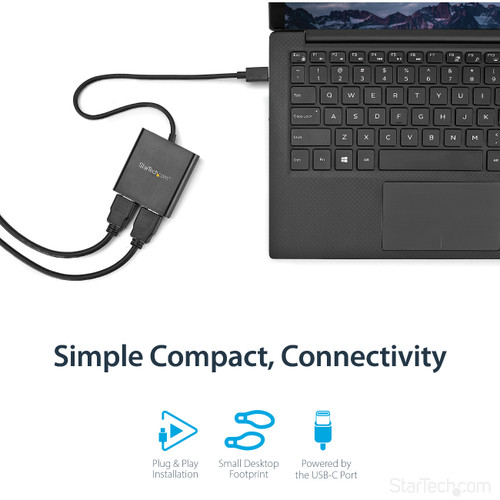
This adapter simplifies multi-monitor setups by eliminating the need for external power or software installation. Its hardware-based design ensures reliable performance across supported Windows laptops, including those with Thunderbolt 3, Thunderbolt 4, or USB4 ports.
These strengths make the product easier to deploy and manage in real environments, especially where reliability, usability, and day-to-day operational continuity matter. Notable benefits include Enhanced Productivity, IT Support Tools.
Enhanced Productivity
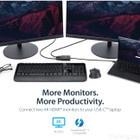
Extend your desktop across two 4K monitors to multitask with spreadsheets, documents, and communication tools side-by-side, boosting efficiency in office or remote work scenarios.
- Dual extended or mirrored displays
- Utilizes GPU for high-performance graphics
IT Support Tools
Includes the Windows Layout Utility, which remembers application window positions when reconnecting the adapter, streamlining workspace restoration for IT help desks and frequent travelers.
Deployment / Use Cases
Ideal for professionals who require additional screen real estate without carrying multiple dongles. The compact form factor and lightweight design make it suitable for on-the-go use in home offices, shared workspaces, or temporary project rooms.
Common deployments include financial analysts running multiple trading platforms, software developers coding across dual monitors, and presentation setups where mirrored content is displayed on two large screens. Its compatibility with 2-in-1 devices and laptops on riser stands addresses ergonomic needs in modern flexible workstations.
Mobile Workspace Expansion
Connect to dual HDMI monitors in hotel conference rooms or coworking spaces using a single USB-C port on your Windows laptop, maintaining a portable yet powerful desktop environment.
IT Department Standardization
Deploy across an organization for consistent multi-monitor support, leveraging the no-driver operation and included utility to reduce setup time and support tickets.
Physical Profile
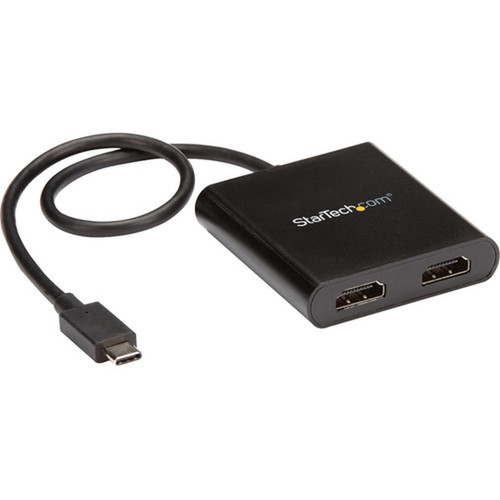
The adapter measures 2.40" (60.96 mm) in length, 2.30" (58.42 mm) in width, and 0.50" (12.70 mm) in height, with a sleek black plastic housing. Its lightweight construction at 1.60 ounces minimizes bulk in laptop bags, while the integrated cable reduces the risk of port damage from frequent connector insertion and removal.
The physical profile is practical for deployment planning because the dimensions and weight are clearly defined: 0.50" (12.70 mm), 2.30" (58.42 mm), 1.60 oz (45.36 g). This helps confirm rack, shelf, desk, or cabinet fit before installation.
- Width
- 2.30" (58.42 mm)
- Height
- 0.50" (12.70 mm)
- Weight
- 1.60 oz (45.36 g)
- Length
- 2.40" (60.96 mm)
What's in the Box
The package includes the USB-C to HDMI Multi-Monitor Splitter (2-Port MST Hub) with attached cable and a quick-start guide to facilitate immediate setup.
Package contents include USB-C to HDMI Multi-Monitor Splitter - 2-Port MST Hub, 1 x Quick-Start Guide. These included items support setup, installation, and immediate deployment without needing to source the core bundled accessories separately.
Highlights
- Drives two HDMI monitors at 4K 30Hz or 1080p 60Hz from a single USB-C port.
- Compatible with Windows laptops featuring USB-C DP Alt Mode, Thunderbolt 3/4, or USB4.
- No drivers or external power required; plug-and-play operation.
- Includes a 1-foot (30 cm) built-in cable for extended reach and reduced port strain.
- Supports Multi-Stream Transport (MST) for independent display control.
- Utilizes host GPU (Intel/AMD/NVIDIA) for graphics processing with minimal CPU usage.
- Compact black plastic design, lightweight at 1.60 oz for easy portability.
- Includes Windows Layout Utility to restore application window positions.
- Backed by a 3-year limited warranty and RoHS environmental compliance.
- Ideal for IT professionals, remote workers, and multi-monitor office setups.
Specifications
| Specifications | |
|---|---|
| Manufacturer | StarTech.com |
| Manufacturer Part Number | MSTCDP122HD |
| Brand Name | StarTech.com |
| Product Name | USB-C to HDMI Multi-Monitor Splitter - 2-Port MST Hub |
| Packaged Quantity | 1 Each |
| Product Type | Signal Splitter |
| Video | |
| Maximum Video Resolution | 3840 × 2160 |
| Interfaces/Ports | |
| HDMI Out | Yes |
| USB | Yes |
| Number of HDMI Outputs | 2 |
| Physical Characteristics | |
| Product Color | Black |
| Product Material | Plastic |
| Height | 0.50" (12.70 mm) |
| Width | 2.30" (58.42 mm) |
| Length | 2.40" (60.96 mm) |
| Weight (Approximate) | 1.60 oz (45.36 g) |
| Miscellaneous | |
| Package Contents | USB-C to HDMI Multi-Monitor Splitter - 2-Port MST Hub 1 x Quick-Start Guide |
| Country of Origin | China |
| Environmentally Friendly | Yes |
| Environmental Certification | EU RoHS |
| Environmental Compliance | Restriction of Hazardous Substances (RoHS) 2,Registration, Evaluation, Authorization and Restriction of Chemicals (REACH),Waste Electrical and Electronic Equipment Directive (WEEE) |
| Warranty | |
| Limited Warranty | 3 Year |
User Manual
FAQ
What is the maximum resolution supported by this USB-C to HDMI adapter?
The StarTech.com MSTCDP122HD supports a maximum video resolution of 3840 × 2160 (4K UHD) at 30Hz on both HDMI outputs simultaneously. For higher refresh rates, it can drive two displays at 1080p resolution and 60Hz, providing flexibility for productivity or media viewing needs.
Is this adapter compatible with macOS or Chromebook devices?
No, this adapter is not compatible with macOS or Chromebook systems. It is designed specifically for Windows laptops that support USB-C DisplayPort Alternate Mode. Compatibility extends to systems with Thunderbolt 3, Thunderbolt 4, or USB4 ports when running Windows, but macOS lacks the necessary MST support for dual display output through this hub.
Does the adapter require external power or software installation?
No external power or software installation is required. The adapter operates in a plug-and-play manner, drawing power directly from the host laptop's USB-C port. It utilizes the existing GPU capabilities of your system, whether integrated (like Intel HD Graphics) or discrete (from AMD or NVIDIA), without needing additional drivers.
What is the purpose of the Windows Layout Utility included with this adapter?
The Windows Layout Utility is a software tool that remembers the positions of your application windows when using the adapter. Upon reconnecting the hub to your laptop, it automatically restores windows to their previous locations on the external monitors. This feature saves time for IT professionals and frequent travelers who frequently switch between single and multi-monitor setups.
Can I use this adapter with a laptop that has only one USB-C port?
Yes, the adapter is designed to connect via a single USB-C port that supports DP Alt Mode. It splits the video signal internally to drive two HDMI monitors, making it ideal for laptops with limited ports. Ensure your laptop's USB-C port supports video output (common in models with Thunderbolt or dedicated video-enabled USB-C) and verify your GPU can handle the total number of displays you intend to use.
What are the physical dimensions and weight of the adapter?
The adapter measures 2.40 inches (60.96 mm) in length, 2.30 inches (58.42 mm) in width, and 0.50 inches (12.70 mm) in height. It weighs approximately 1.60 ounces (45.36 grams), making it compact and lightweight for easy transport in laptop bags or briefcases without adding significant bulk.
What resolution or display format is specified?
It features a display specification of 3840 × 2160, giving you clear visuals for work and media use.
What refresh rate or brightness details are available?
Display-oriented products are best judged through screen, connectivity, and installation specifications. Those facts help buyers confirm visual fit, mounting flexibility, and deployment suitability more clearly than generic summary text.
| Qty | Price | Available |
|---|