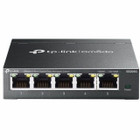
TP-LINK ES205G Omada 5-Port Gigabit Easy Managed Switch - Layer 2 - Desktop/Wall Mount - Fanless

Business volume discounts
Technical guidance
Preparation & staging
QC · ON · AB · BC
Product Features
Technical Overview
The ES205G delivers full Gigabit Ethernet performance across all five RJ-45 ports, supporting 10/100/1000 Mbps auto-negotiation and auto-MDI/MDIX on twisted pair cabling. Its switching fabric is built for Layer 2 operation, supporting key protocols including IEEE 802.1Q for VLAN segmentation and IEEE 802.1p for traffic prioritization, which are fundamental for organizing network traffic and improving performance in mixed-use environments.
The device is powered by a 5V DC external adapter, contributing to its low power draw and fanless thermal design. This eliminates moving parts for completely silent operation, making it suitable for noise-sensitive areas like offices or living spaces. The metal casing provides durability and aids in passive heat dissipation.
Relevant factors for this section include Features, Total Number of Network Ports, Network (RJ-45), Port/Expansion Slot Details. When those points are considered together, they give buyers a clearer picture of how the product is equipped, how it fits into deployment, and what kind of day-to-day role it is meant to support.
Key Product Advantages
The ES205G simplifies network management for growing setups. Its Omada integration allows administrators to monitor and configure the switch alongside a unified network of devices from a single cloud-based dashboard or mobile app, reducing management overhead compared to standalone devices.
Centralized Cloud Management
Manage the switch remotely via the Omada cloud platform or local web interface, enabling configuration of VLANs, IGMP snooping, and loop prevention without on-site technical visits.
- Web-based management
- Omada app support
- Zero-Touch Provisioning (ZTP) ready
Reliable and Quiet Design
The fanless metal construction ensures silent 24/7 operation with enhanced durability, suitable for desktop or wall-mounted deployment in office or retail environments.
- No noise from fans
- Metal housing for longevity
- Compact footprint
Deployment / Use Cases
This switch is ideal for small offices, retail spaces, or home offices needing to segment network traffic or prioritize applications without investing in complex enterprise-grade hardware. Its five Gigabit ports provide ample connectivity for computers, printers, IP phones, and access points in a typical workgroup.
Common deployments include creating a separate VLAN for guest Wi-Fi to enhance security, using QoS to prioritize video conferencing traffic, or connecting devices in a small studio or classroom. The wall-mount capability allows for discreet installation under desks or in network cabinets, while the desktop form factor offers flexibility for open spaces.
Small Office Networking
Connect multiple workstations and network peripherals with managed features to improve network organization and performance for daily business operations.
Home Office or Studio
Expand wired network connections for computers, NAS devices, and gaming consoles with silent operation and basic traffic management tools.
Physical Profile
The switch features a compact, square design measuring 3.90" in width and depth and 1" in height, with a weight of 7.76 oz. This small footprint conserves space on desktops or in tight installations. The metal casing not only protects internal components but also serves as a heat sink for the fanless design, ensuring reliable operation. Pre-drilled holes on the bottom allow for secure wall mounting, offering placement flexibility in various environments.
- Width
- 3.90" (99.06 mm)
- Depth
- 3.90" (99.06 mm)
- Height
- 1" (25.40 mm)
- Weight
- 7.76 oz (220 g)
Highlights
- 5× Gigabit Ethernet ports (10/100/1000 Mbps) for high-speed wired connections
- Layer 2 managed switch with support for VLANs, QoS, and IGMP snooping
- Centralized management via Omada cloud platform or local web interface
- Fanless metal design for silent and durable 24/7 operation
- Plug-and-play setup with optional advanced configuration for growing networks
- Desktop or wall-mountable form factor for flexible deployment
- Supports Zero-Touch Provisioning (ZTP) for simplified deployment
- Complies with RoHS environmental standards
Specifications
| Specifications | |
|---|---|
| Manufacturer | TP-LINK Technologies Co., Ltd |
| Manufacturer Part Number | ES205G |
| Brand Name | TP-Link |
| Product Line | Omada |
| Product Model | ES205G |
| Product Name | Omada 5-Port Gigabit Easy Managed Switch |
| Product Type | Ethernet Switch |
| Technical Information | |
| Features | Plug and Play,Fanless,Reset Button,Zero-Touch Provisioning (ZTP),Intelligent monitoring |
| Interfaces/Ports | |
| Total Number of Network Ports | 5 |
| Network (RJ-45) | Yes |
| Port/Expansion Slot Details | 5 × GIgabit Ethernet Network |
| Media & Performance | |
| Media Type Supported | Twisted Pair |
| Ethernet Technology | Gigabit Ethernet |
| Network Technology | 10/100/1000Base-T |
| Network & Communication | |
| Layer Supported | 2 |
| Networking Standards | IEEE 802.3i,IEEE 802.3u,IEEE 802.3ab,IEEE 802.3x,IEEE 802.1p,IEEE 802.1Q |
| Management & Protocols | |
| Manageable | Yes |
| Power Description | |
| Input Voltage | 5 V DC |
| Power Source | Power Adapter,DC |
| Physical Characteristics | |
| Product Material | Metal |
| Form Factor | Desktop,Wall Mountable |
| Height | 1" (25.40 mm) |
| Width | 3.90" (99.06 mm) |
| Depth | 3.90" (99.06 mm) |
| Weight (Approximate) | 7.76 oz (220 g) |
| Miscellaneous | |
| Environmental Compliance | Restriction of Hazardous Substances (RoHS) |
User Manual
FAQ
How many devices can I connect to the TP-Link ES205G switch?
The ES205G provides five Gigabit Ethernet ports, allowing you to connect up to five wired devices such as computers, printers, IP phones, or access points directly. For more devices, you can connect another switch to one of its ports to expand the network further.
Does this switch support Power over Ethernet (PoE)?
No, the TP-Link ES205G does not support Power over Ethernet. It is a non-PoE switch, meaning connected devices must have their own separate power sources. For PoE needs, consider TP-Link's PoE-enabled switch models within the Omada lineup.
What is the difference between a managed and unmanaged switch?
A managed switch like the ES205G allows you to configure network settings such as VLANs, Quality of Service (QoS), and port monitoring for better traffic control and security. An unmanaged switch simply forwards data without configuration options. The ES205G offers easy management via a web interface or Omada app, making it accessible for users needing basic control.
Can I mount this switch on a wall?
Yes, the ES205G is designed for both desktop and wall mounting. It includes pre-drilled holes on the bottom for secure wall installation, which helps save space and organize cables in offices, retail environments, or home networks.
What does Layer 2 support mean for this switch?
Layer 2 support means the switch operates at the data link layer of the network, enabling features like VLANs (802.1Q) to segment network traffic, QoS (802.1p) to prioritize data, and MAC address learning for efficient forwarding. This provides basic traffic management without the routing capabilities of Layer 3 switches.
Is the TP-Link ES205G compatible with other Omada devices?
Yes, the ES205G is part of the TP-Link Omada ecosystem, allowing for centralized management with other Omada products such as wireless access points, routers, and controllers. You can monitor and configure all compatible devices from a single Omada cloud or local interface for a unified network experience.
| Qty | Price | Available |
|---|