








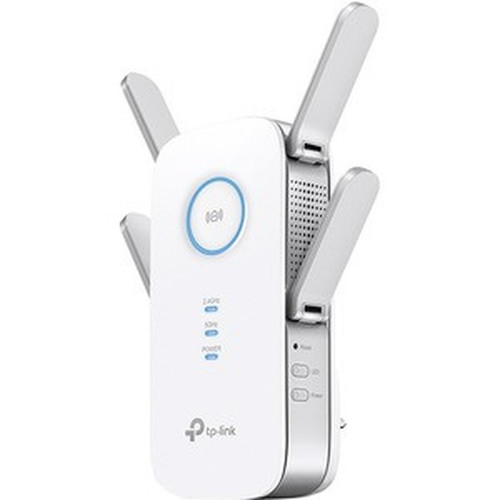

TP-LINK RE650 AC2600 Wi-Fi Range Extender - Dual-Band 2.4/5 GHz - 2.54 Gbit/s - 4 External Antennas - MU-MIMO - Beamforming - Gigabit Ethernet Port

Business volume discounts
Technical guidance
Preparation & staging
QC · ON · AB · BC
Product Features
Technical Overview
The RE650 leverages advanced wireless technologies to maximize performance and reliability. It supports IEEE 802.11ac standards, enabling faster data rates and improved network efficiency compared to older Wi-Fi generations. The dual-band operation allows devices to connect on either the 2.4 GHz band for longer range or the 5 GHz band for less interference and higher throughput.
MU-MIMO Wave 2 technology enables the extender to communicate with multiple devices simultaneously, reducing latency and optimizing bandwidth allocation. Beamforming technology directs Wi-Fi signals toward connected devices, strengthening connections and minimizing drop-offs. Data encryption is supported with standards including 64-bit WEP, 128-bit WEP, WPA-PSK, and WPA2-PSK to secure network traffic.
Relevant factors for this section include Wireless LAN Standard, Frequency Band, Total Number of Antennas, Ethernet Technology. When those points are considered together, they give buyers a clearer picture of how the product is equipped, how it fits into deployment, and what kind of day-to-day role it is meant to support.
Key Product Advantages
The RE650 offers distinct advantages for users seeking to extend Wi-Fi coverage without compromising on speed or stability. Its quad-antenna design enhances signal reach and penetration, ensuring reliable connectivity across larger areas or through obstacles like walls and floors.
Smart Placement Guidance
Smart indicator lights assist in finding the optimal installation spot between your router and the desired coverage area, simplifying setup and maximizing effectiveness.
- Visual signal strength indicators
- Easy positioning guidance
Enhanced Device Performance
MU-MIMO and beamforming work together to deliver targeted, high-performance Wi-Fi to multiple devices, ideal for households with simultaneous streaming, gaming, and smart home usage.
- Simultaneous multi-device communication
- Focused signal delivery
Deployment / Use Cases
The TP-Link RE650 is suitable for various environments where extended Wi-Fi coverage is needed. In residential settings, it eliminates dead zones in basements, garages, or backyard areas, supporting activities like online gaming, 4K video streaming, and smart home device connectivity.
For small business or retail applications, the extender provides stable connections for point-of-sale systems, inventory management devices, and customer Wi-Fi access. Its compatibility with a wide range of routers makes it a flexible addition to existing networks without requiring hardware upgrades.
Home Entertainment & Gaming
Deliver strong Wi-Fi signals to entertainment centers and gaming setups, reducing lag and buffering for an uninterrupted experience.
- Supports high-bandwidth streaming
- Reduces latency for online gaming
Small Office Connectivity
Extend network coverage to conference rooms, reception areas, or remote workstations, ensuring reliable internet access for business operations.
- Stable connections for POS systems
- Broad coverage for office devices
Physical Profile
The RE650 features a compact plug-in design that integrates directly into standard wall outlets, minimizing clutter and saving space. Its external antennas are adjustable to fine-tune signal direction, and the unit's dimensions of 6.40" wide by 3.40" deep by 1.60" high ensure it fits discreetly in most environments. The build complies with RoHS environmental standards, reflecting a commitment to reduced hazardous substances.
- Width
- 6.40" (162.56 mm)
- Depth
- 3.40" (86.36 mm)
- Height
- 1.60" (40.64 mm)
What's in the Box
The package includes all necessary components for immediate setup and use.
Package contents include AC2600 Wi-Fi Range Extender Quick Installation Guide, AC2600 Wi-Fi Range Extender. These included items support setup, installation, and immediate deployment without needing to source the core bundled accessories separately.
Highlights
- Extends Wi-Fi coverage with dual-band 2.4 GHz (800 Mbps) and 5 GHz (1733 MHz) support.
- Features four external antennas for enhanced signal range and penetration.
- Utilizes MU-MIMO Wave 2 technology to communicate with multiple devices simultaneously.
- Beamforming technology directs Wi-Fi signals to individual devices for stronger connections.
- Includes a Gigabit Ethernet port to connect wired devices for high-speed network access.
- Smart indicator lights assist in optimal placement between router and coverage area.
- Easy to install and compatible with any router, gateway, or access point.
- Supports encryption standards like WPA2-PSK for secure network traffic.
- Compact plug-in form factor saves space and integrates into wall outlets.
- RoHS compliant and backed by a 2-year warranty from TP-Link.
Specifications
| Specifications | |
|---|---|
| Manufacturer | TP-LINK Technologies Co., Ltd |
| Manufacturer Part Number | RE650 |
| Brand Name | TP-Link |
| Product Model | RE650 |
| Product Name | AC2600 Wi-Fi Range Extender |
| Packaged Quantity | 1 |
| Product Type | Wireless Range Extender |
| Technical Information | |
| Wireless LAN Standard | IEEE 802.11ac |
| Frequency Band | 5 GHz,2.40 GHz |
| Total Number of Antennas | 4 |
| Number of External Antennas | 4 |
| Wireless Transmission Speed | 2.54 Gbit/s |
| MIMO Technology | Yes |
| Beamforming Technology | Yes |
| Data Encryption | Yes |
| Encryption Standard | 64-bit WEP,128-bit WEP,WPA-PSK,WPA2-PSK |
| Interfaces/Ports | |
| Ethernet Technology | Gigabit Ethernet,Fast Ethernet,Ethernet |
| Number of Network (RJ-45) Ports | 1 |
| PoE (RJ-45) Port | No |
| VGA | No |
| HDMI | No |
| USB | No |
| Powerline | No |
| Management Port | No |
| Power Description | |
| Power Consumption | 12 W |
| Physical Characteristics | |
| Form Factor | Plug-in |
| Antenna Form Factor | External |
| Height | 1.60" (40.64 mm) |
| Width | 6.40" (162.56 mm) |
| Depth | 3.40" (86.36 mm) |
| Miscellaneous | |
| Package Contents | AC2600 Wi-Fi Range Extender Quick Installation Guide |
| Environmentally Friendly | Yes |
| Environmental Compliance | Restriction of Hazardous Substances (RoHS) |
| Country of Origin | China |
FAQ
What is the wireless standard supported by the TP-Link RE650?
The TP-Link RE650 supports the IEEE 802.11ac wireless standard, which provides faster data rates, improved efficiency, and better performance compared to older standards like 802.11n. This standard enables dual-band operation on 2.4 GHz and 5 GHz frequencies, contributing to the extender's total speed of up to 2.54 Gbit/s.
How many antennas does the RE650 have, and are they external?
The RE650 has a total of four antennas, all of which are external. These adjustable antennas enhance signal reach and coverage, allowing for better Wi-Fi distribution across larger areas or through obstacles like walls. The external design supports fine-tuning for optimal performance.
Does the RE650 support MU-MIMO and beamforming technologies?
Yes, the RE650 supports both MU-MIMO Wave 2 and beamforming technologies. MU-MIMO allows the extender to communicate with multiple devices at the same time, reducing latency and improving network efficiency. Beamforming directs Wi-Fi signals toward connected devices, strengthening individual connections and minimizing drop-offs.
What type of Ethernet port is included on the RE650?
The RE650 includes one Gigabit Ethernet port, which supports Gigabit Ethernet, Fast Ethernet, and Ethernet technologies. This port allows you to connect wired devices like desktop computers, gaming consoles, or smart TVs directly to the extender for high-speed, stable network access.
Is the RE650 powered by Power over Ethernet (PoE)?
No, the RE650 does not support Power over Ethernet (PoE). It is powered through a standard wall outlet with a plug-in form factor, drawing 12 W of power. This design simplifies installation by eliminating the need for separate power adapters or PoE injectors.
What is included in the package with the RE650?
The package includes the AC2600 Wi-Fi Range Extender unit and a Quick Installation Guide. The guide provides step-by-step instructions for setting up the extender, connecting it to your existing network, and optimizing placement using the smart indicator lights for best performance.
| Qty | Price | Available |
|---|


