



Shipping included*
Exclusions
Additional shipping fees may apply in rare circumstances for deliveries outside standard service areas. In most cases, this only potentially affects shipments to the Northwest Territories and Yukon, as well as certain heavy or oversized items.
Yealink 1106992 MVC400 Microsoft Teams Rooms System - Small Room Video Conferencing - 1920 x 1080

Business volume discounts
Technical guidance
Preparation & staging
QC · ON · AB · BC
Product Features
Product Overview
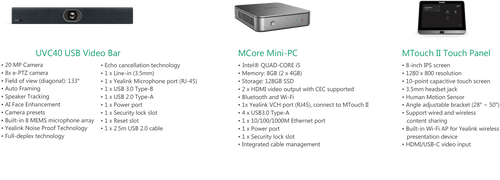
The Yealink MVC400 Microsoft Teams Rooms System delivers a complete, integrated video conferencing solution engineered specifically for small meeting room environments. This turnkey system combines dedicated hardware and optimized software to create a seamless Microsoft Teams meeting experience with professional 1920x1080 video quality.
As a dedicated Teams Room system, the MVC400 provides everything needed for professional video conferences without requiring additional computing devices. The system is optimized for environments where space efficiency and setup simplicity are priorities, offering a streamlined deployment that reduces IT overhead while ensuring consistent performance.
Relevant factors for this section include SKU. When those points are considered together, they give buyers a clearer picture of how the product is equipped, how it fits into deployment, and what kind of day-to-day role it is meant to support.
Technical Overview
The MVC400 operates as a Microsoft Teams Rooms certified system, ensuring full compatibility and optimized performance within Microsoft's collaboration ecosystem. This certification guarantees that the system meets Microsoft's stringent requirements for reliability, security, and user experience.
The system supports 1920x1080 video resolution for clear, detailed conference visuals that maintain professional quality even in small room settings. This solution includes comprehensive documentation and support resources, with multiple PDF guides available covering setup, deployment, and ongoing system management.
Relevant factors for this section include SKU. When those points are considered together, they give buyers a clearer picture of how the product is equipped, how it fits into deployment, and what kind of day-to-day role it is meant to support.
A strong technical summary explains how the product's interfaces, hardware profile, and operating characteristics work together in real deployment. Buyers often need this context to confirm compatibility with existing devices, expected performance in daily use, and whether installation will be straightforward for IT staff or end users.
Key Product Advantages
The MVC400's primary advantage lies in its complete, optimized solution approach that eliminates compatibility concerns and simplifies deployment. As a dedicated Microsoft Teams Rooms system, it delivers consistent performance without the complexity of piecing together separate components.
Certified Compatibility
Microsoft Teams Rooms certification ensures the system works seamlessly with Microsoft's collaboration platform, providing guaranteed compatibility and optimized performance.
- No compatibility testing required
- Optimized for Teams ecosystem
- Microsoft-approved deployment
Small Room Optimization
Specifically engineered for small meeting spaces, the system balances performance with space efficiency while maintaining professional video quality.
- Space-efficient design
- Professional 1080p video
- Simplified installation
Complete Documentation
Comprehensive PDF guides cover every aspect from initial setup to ongoing management, reducing deployment time and supporting IT staff.
- Setup guides included
- Deployment documentation
- Management resources
Deployment / Use Cases
The MVC400 is ideally suited for small meeting rooms in corporate offices, educational institutions, healthcare facilities, and government buildings where reliable video conferencing is essential but space is limited. Its turnkey nature makes it particularly valuable for organizations seeking to standardize their meeting room technology without extensive IT involvement.
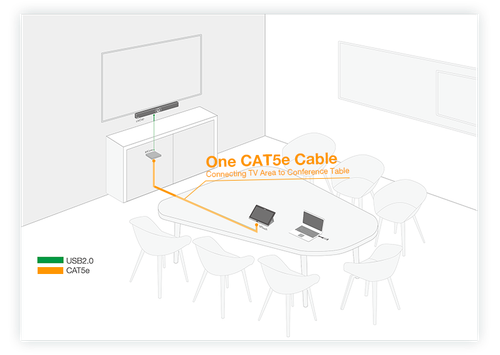
Primary deployment scenarios include huddle rooms, executive offices, small conference rooms, and training spaces where participants need professional-grade video conferencing capabilities. The system's integrated approach eliminates the need for separate computers, cameras, and audio devices, creating a cleaner installation with fewer potential failure points.
Corporate Huddle Rooms
Perfect for small collaboration spaces where teams gather for quick meetings, providing professional video quality without occupying valuable floor space.
Standardized Room Deployments
Enables consistent meeting experiences across multiple locations with predictable performance and simplified management through centralized documentation.
Highlights
- Microsoft Teams Rooms certified system
- Designed specifically for small meeting room environments
- 1920x1080 Full HD video resolution support
- Complete, integrated video conferencing solution
- Includes comprehensive setup and deployment documentation
- Remote management capabilities for IT administration
- Optimized for Microsoft Teams ecosystem compatibility
- Turnkey deployment with integrated hardware and software components
Specifications
| General | |
|---|---|
| Brand | Yealink |
| SKU | 1106992 |
| Manufacturer Part Number | 1106992 |
User Manual
FAQ
What room size is the Yealink MVC400 designed for?
The Yealink MVC400 Microsoft Teams Rooms System is specifically engineered for small meeting room environments. This includes spaces like huddle rooms, executive offices, and small conference rooms where space efficiency and professional video conferencing capabilities are both priorities. The system's integrated design and optimized performance make it ideal for rooms where participants need reliable, high-quality video meetings without complex setups.
Is the MVC400 certified for Microsoft Teams?
Yes, the Yealink MVC400 is a Microsoft Teams Rooms certified system. This certification guarantees that the hardware and software have been tested and approved by Microsoft for compatibility, reliability, and optimal performance within the Teams ecosystem. Certified systems ensure seamless integration, predictable behavior, and access to Microsoft's support resources for deployment and management.
What documentation is included with the system?
The MVC400 includes comprehensive documentation in PDF format covering setup, deployment, and system management. Multiple guides are provided to support IT staff through the entire implementation process, from initial installation to ongoing administration. This documentation reduces deployment time, ensures proper configuration, and provides reference materials for troubleshooting and maintenance.
Does this system require a separate computer?
No, the Yealink MVC400 is a complete, integrated video conferencing solution that does not require additional computing devices. The system combines dedicated hardware and optimized software specifically designed for Microsoft Teams Rooms, providing everything needed for professional video conferences in a single, streamlined package. This integrated approach simplifies deployment and reduces potential compatibility issues.
What management capabilities does the MVC400 offer?
The MVC400 includes remote management capabilities that allow IT administrators to monitor and maintain the system without physical access to the meeting room. These capabilities support centralized administration across multiple room deployments, enabling configuration updates, performance monitoring, and troubleshooting from a single interface. This reduces the operational overhead of maintaining meeting room technology across an organization.
What screen size is listed?
Yealink MVC400 Microsoft Teams Rooms System - For Meeting Room, Video Conferencing - Small Room Size Supported - 1920 x 1080 Video - - (1106992) is best judged through its screen, connectivity, and installation specifications, which help buyers confirm visual fit and deployment suitability.
| Qty | Price | Available |
|---|