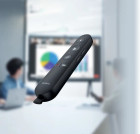
Yealink MB-REMOTE Wireless Presentation Remote for MeetingBoard & MeetingBoard Pro - Air Mouse & Multimedia Control

Business volume discounts
Technical guidance
Preparation & staging
QC · ON · AB · BC
Product Features
Product Overview
The Yealink MB-REMOTE wireless presentation pod is a specialized remote control engineered specifically for Yealink MeetingBoard and MeetingBoard Pro conference systems. This device transforms how presenters interact with their content during meetings, offering precise control and seamless navigation without being tethered to the host device.
Unlike generic presentation remotes, the MB-REMOTE integrates directly with Yealink's conference ecosystem, ensuring reliable performance and optimized functionality. It serves as both a presentation controller and an air mouse, allowing presenters to manage slides, documents, and multimedia content from anywhere in the meeting room.
This section brings together practical product details such as SKU, so buyers can judge configuration, deployment fit, and day-to-day suitability with less guesswork.
In practical terms, this overview should help a buyer understand what the product is, the type of environment it suits, and the core reasons it may be chosen over a more generic alternative. That context is especially useful for business purchasing, where fit, consistency, and ease of use usually matter as much as individual specifications.
Technical Overview
The MB-REMOTE operates wirelessly through a pre-paired USB dongle that connects to the host MeetingBoard system. This wireless design eliminates cable clutter and provides presenters with freedom of movement during presentations. The remote includes multimedia page-turning functionality for advancing slides and documents, along with air mouse capabilities for cursor control and on-screen navigation.
Setup is simplified through factory pairing—the USB dongle and remote are matched during manufacturing, so users simply plug the dongle into the host device to begin operation. This plug-and-play approach reduces configuration time and ensures immediate compatibility with supported Yealink systems.
This section brings together practical product details such as SKU, so buyers can judge configuration, deployment fit, and day-to-day suitability with less guesswork.
A strong technical summary explains how the product's interfaces, hardware profile, and operating characteristics work together in real deployment. Buyers often need this context to confirm compatibility with existing devices, expected performance in daily use, and whether installation will be straightforward for IT staff or end users.
Key Product Advantages
The MB-REMOTE delivers several distinct advantages for professional meeting environments. Its specialized design for Yealink conference systems ensures seamless integration and reliable performance that generic remotes cannot match.
Enhanced Presenter Mobility
Presenters can move freely around the room while maintaining full control over slides, documents, and multimedia content, creating more engaging and dynamic presentations.
- Wireless operation eliminates cable restrictions
- Air mouse functionality enables precise cursor navigation from anywhere in the room
Simplified Deployment
The factory-paired USB dongle eliminates complex setup procedures, allowing immediate use without technical configuration or pairing steps.
- Pre-paired during manufacturing
- Plug-and-play operation reduces IT support requirements
Optimized Conference Integration
Designed specifically for Yealink MeetingBoard systems, this remote provides functionality tailored to professional conference environments rather than generic presentation scenarios.
- Direct compatibility with MeetingBoard ecosystem
- Reliable performance in business meeting contexts
Deployment / Use Cases
The Yealink MB-REMOTE is ideal for professional meeting environments where presenters need flexible control over conference content without being confined to a specific location near the host system.
This remote excels in conference rooms, boardrooms, training facilities, and collaborative workspaces where Yealink MeetingBoard systems are deployed. It supports various presentation scenarios including slide decks, document reviews, multimedia playback, and interactive discussions.
This section brings together practical product details such as SKU, so buyers can judge configuration, deployment fit, and day-to-day suitability with less guesswork.
Corporate Boardroom Presentations
Executives and presenters can move freely while controlling slides and documents during important meetings, maintaining engagement without being anchored to the conference table.
Training and Educational Sessions
Trainers and educators can navigate training materials while interacting with participants, creating more dynamic learning environments in corporate training rooms or educational facilities.
Highlights
- Wireless presentation remote for Yealink MeetingBoard systems
- Multimedia page-turning control for slides and documents
- Air mouse functionality for cursor navigation
- Factory-paired USB dongle for plug-and-play setup
- Designed specifically for MeetingBoard and MeetingBoard Pro
- Enables presenter mobility during meetings
- Simplified installation with no pairing required
- Includes protective carrying bag and cover
Specifications
| General | |
|---|---|
| Brand | Yealink |
| SKU | MB-REMOTE |
| Manufacturer Part Number | MB-REMOTE |
User Manual
FAQ
What port count or interface mix is listed?
the specifications are intended to help buyers confirm fit, compatibility, and expected day-to-day operation. In practical terms, the best reading of this product comes from how its hardware, connectivity, and deployment details work together.
What throughput, switching capacity, or performance detail is listed?
the specifications are intended to help buyers confirm fit, compatibility, and expected day-to-day operation. In practical terms, the best reading of this product comes from how its hardware, connectivity, and deployment details work together.
What uplink, SFP, fiber, or media support detail is listed?
the specifications are intended to help buyers confirm fit, compatibility, and expected day-to-day operation. In practical terms, the best reading of this product comes from how its hardware, connectivity, and deployment details work together.
Does the product support PoE or wireless networking?
Connectivity details help confirm how the product integrates with your network, accessories, and surrounding peripherals before rollout or replacement planning. They are often the difference between a technically compatible device and one that is genuinely easy to deploy.
What mounting, rack, or form-factor detail is listed?
the specifications are intended to help buyers confirm fit, compatibility, and expected day-to-day operation. In practical terms, the best reading of this product comes from how its hardware, connectivity, and deployment details work together.
What management or control capability is listed?
the specifications are intended to help buyers confirm fit, compatibility, and expected day-to-day operation. In practical terms, the best reading of this product comes from how its hardware, connectivity, and deployment details work together.
What deployment or installation detail is listed?
the specifications are intended to help buyers confirm fit, compatibility, and expected day-to-day operation. In practical terms, the best reading of this product comes from how its hardware, connectivity, and deployment details work together.
What performance, throughput, or capacity detail stands out?
the specifications are intended to help buyers confirm fit, compatibility, and expected day-to-day operation. In practical terms, the best reading of this product comes from how its hardware, connectivity, and deployment details work together.
| Qty | Price | Available |
|---|